Uživatelská a metodická příručka aplikace Inkubáze
1. Účel aplikace
Inkubáze je otevřená platforma pro evidenci, analýzu a sdílení dat o inkubaci ptačích vajec. Slouží k jednotnému vedení údajů o vejcích, inkubátorech, průběhu a výsledku inkubace a souvisejících druhových informací.
Smyslem aplikace je převést provozní inkubační evidenci do strukturované podoby, která je použitelná nejen pro aktuální práci v líhni, ale také pro dlouhodobé vyhodnocování, porovnávání a sdílení zkušeností. Inkubáze ale není pouze elektronický deník. Z vkládaných záznamů průběžně počítá odvozené charakteristiky, například odhad počáteční hmotnosti, denní úbytek hmotnosti nebo konduktanci. Ty pak průběžně sumarizuje napříč vejci daného druhu a odvozuje doporučenou vlhkost nebo návrhy optimalizace podmínek v inkubátorech.
A jak to vlastně dělá? Aplikace pracuje s druhem, rozměry, počáteční hmotností, datem snesení nebo začátku inkubace, průběžnými váženími, teplotou, vlhkostí a dostupnými druhovými statistikami. Na základě těchto vstupů může vyhodnotit, zda hmotnost konkrétního vejce v konkrétním inkubátoru ubývá přiměřeným tempem, jak se jeho průběh liší od dostupných dat úspěšných nebo neúspěšných inkubací a jaké nastavení vlhkosti by mělo lépe odpovídat cílovému úbytku hmotnosti.
Velikou výhodou ale je, že se průběh inkubace neporovnává pouze s vašimi vlastními záznamy. Data z jednotlivých chovů totiž mohou při vhodně nastaveném režimu přístupu vstupovat do souhrnných druhových statistik a do Inkupedie – inkubační encyklopedie. To je důležité zejména u vzácně chovaných, obtížně odchovatelných nebo ohrožených druhů, kde je počet dostupných případů malý a praktické zkušenosti jsou často rozptýlené mezi více institucí. Standardizovaná evidence umožňuje tyto zkušenosti porovnávat a postupně z nich vytvářet použitelná metodická doporučení.
Inkubáze zároveň usnadňuje spolupráci mezi chovateli, kurátory, institucemi a vědci. Chovatelům a institucím poskytuje nástroj pro přehlednou správu líhní a dat. Výzkumným pracovníkům umožňuje vyhledávat dostupné datasety, kontaktovat původce dat a pracovat s informacemi, které by se jinak obtížně shromažďovaly. Díky tomu může platforma sloužit jak provozním potřebám chovu, tak odborným a vědeckým analýzám inkubace ptačích vajec.
1.1 Pro koho je Inkubáze určena
Pro chovatele je Inkubáze pracovní nástroj k vedení inkubační evidence. Umožňuje:
zapisovat, sledovat a analyzovat inkubaci jednotlivých vajec,
průběžně kontrolovat jejich hmotnost,
získávat doporučení pro nastavení inkubátoru,
porovnávat vlastní data s dostupnými záznamy z jiných chovů.
Pro kurátory a instituce je Inkubáze nástrojem pro správu a kontrolu dat. Pomáhá:
udržet pořádek v líhních,
soustředit údaje o vejcích, inkubátorech a výsledcích na jednom místě,
tvořit přehledy a exporty,
připravovat daty podložené metodické pokyny,
rozhodovat, která data budou sdílena s dalšími uživateli nebo vědeckou komunitou.
Pro vědce je Inkubáze zdrojem standardizovaných a často obtížně dostupných datasetů. Umožňuje:
zahrnout do výzkumu i druhy, které jsou v literatuře málo zastoupené,
propojovat primární chovatelská data s otázkami reprodukční biologie, fyziologie, behaviorální ekologie a ochrany ohrožených druhů.
1.2 Hlavní cíle aplikace
Hlavní cíle aplikace jsou:
- uchovávat údaje o každém vejci v podobě srozumitelných a dohledatelných dat,
- sjednotit evidenci inkubačních dat mezi chovateli, zoologickými zahradami, záchrannými stanicemi, výzkumnými pracovišti a dalšími institucemi,
- minimalizovat neúplnost evidence vznikající při vedení oddělených sešitů, lokálních tabulek nebo neúplných záznamů,
- minimalizovat chyby při zadávání dat,
- průběžně analyzovat průběh inkubace a upozorňovat na hodnoty, které se odchylují od očekávaného vývoje,
- pomoci vyhodnocovat, zda hmotnost vejce ubývá přiměřeným tempem vzhledem k druhu, fázi inkubace a cílovému úbytku hmotnosti,
- doporučit vlhkost podle aktuálního stavu konkrétního vejce a aktuálních nebo zadaných podmínek,
- navrhnout vhodnější nastavení vlhkosti v inkubátoru nebo přesun vajec mezi inkubátory,
- umožnit bezpečné sdílení vybraných dat podle nastavených licenčních a přístupových režimů,
- vytvářet Inkupedii jako průběžně aktualizovaný druhový přehled ptačí inkubace,
- podporovat vznik daty podložených metodik pro chov a inkubaci obtížně odchovatelných nebo ohrožených druhů,
- propojovat původce dat s vědci a odborníky, kteří mohou data využít k hledání širších biologických souvislostí,
- dlouhodobě zvyšovat úspěšnost líhnutí, kvalitu odchovu a hodnotu chovatelských zkušeností pro ochranu ptáků v lidské péči.
2. Základní pojmy
| Pojem | Význam v aplikaci |
|---|---|
| Vejce | Konkrétní evidované vejce s identifikátorem, druhem, rozměry, hmotností, daty a výsledkem inkubace. |
| Průběh inkubace | Jednotlivé časové záznamy: hmotnost vejce, inkubátor, chlazení, prosvěcování, vývoj a manipulace. Teplotu a vlhkost předchozího období aplikace odvozuje z historie údržby inkubátoru. |
| Inkubátor | Zařízení, ve kterém jsou vejce inkubována. Má stanovenou kapacitu a váží se k němu záznamy údržby, včetně teploty, vlhkosti a provozního stavu. |
| Záznam údržby inkubátoru | Časový záznam nastavení nebo stavu inkubátoru: teplota, vlhkost, otáčení, chlazení, dezinfekce, filtr, odstavení. |
| Druhová statistika | Souhrn odvozený z publikovaných vajec stejného kanonického druhu, u nichž uplynul případný odklad. Zahrnuje počty výsledků, rozměry, hmotnosti, inkubační periodu, úbytky hmotnosti a doporučené parametry podle dostupnosti validních vstupů. |
| Inkupedie | Přehled druhů a jejich dostupných referenčních a vypočtených inkubačních parametrů. |
| Cílový úbytek hmotnosti | Předpokládaný procentuální úbytek hmotnosti vejce během efektivní inkubační periody. |
| Konduktance | Propustnost vejce pro vodní páru, vyjádřená množstvím vody v mg odpovídajícím dennímu úbytku hmotnosti při daném rozdílu parciálních tlaků. |
| Efektivní inkubační okno | V některých výpočtech se používá 96 procent inkubační periody. Prakticky jde o období do konce hlavní fáze úbytku hmotnosti před líhnutím. |
3. Registrace a založení instituce
Uživatelský účet je nutný pro zadávání a správu inkubačních dat, práci s neveřejnými částmi databáze, podávání žádostí o přístup k datům a používání interních funkcí Inkubáze. Bez registrace lze prohlížet veřejně dostupné souhrnné výstupy, zejména Inkupedii. Při registraci se uživatel rozhoduje, zda bude aplikaci používat bez institucionálního členství, požádá o připojení k již existující instituci, nebo založí instituci novou.
3.1 Registrace uživatelského účtu
Na úvodní stránce zvolte Registrace. Formulář vytváří osobní uživatelský účet; přístupová práva k institucionálním datům se následně odvíjejí od zvolené instituce a stavu členství.
- Jméno a příjmení: identifikace uživatele.
- E-mail: musí být v databázi jedinečný; používá se také pro oznámení, komunikaci se správci a obnovení hesla.
- Uživatelské jméno: jedinečné označení účtu. K přihlášení lze použít uživatelské jméno nebo e-mail.
- Heslo a potvrzení hesla: obě pole jsou povinná a zadané hodnoty se musí shodovat.
- Instituce: určuje výchozí režim účtu, lze zvolit omezený režim bez instituce, zažádat o členství nebo založit novou instituci.
- Fotografie uživatele: nepovinný profilový obrázek ve formátu JPG, JPEG, PNG nebo GIF.
- Preferovaný jazyk: určuje výchozí jazyk uživatelského rozhraní a emailové korespondence. K dispozici CZ a EN.
- Podmínky používání: souhlas je pro dokončení registrace povinný.
- E-mailové informace o rozvoji Inkubáze: samostatný a nepovinný souhlas se zasíláním novinek a důležitých aktualizací.
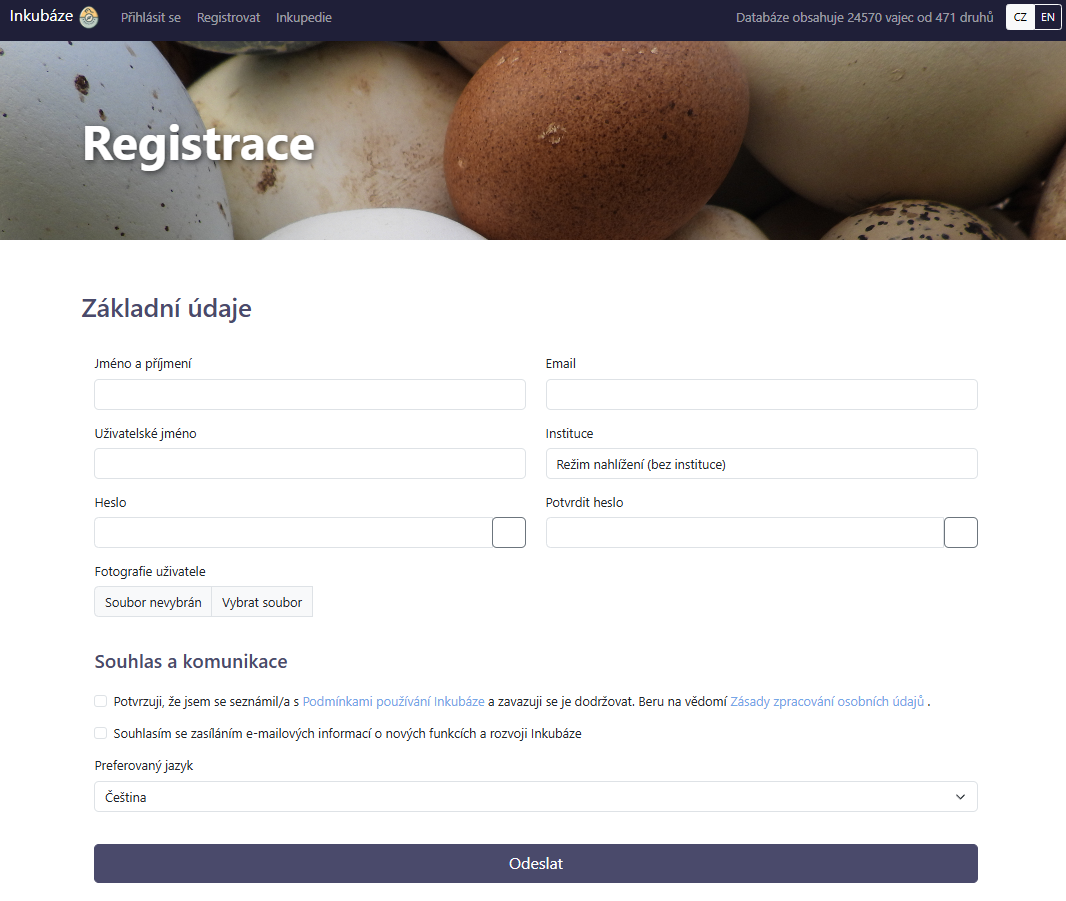
Obr. 1. Registrační formulář.
Před odesláním zkontrolujte zejména e-mailovou adresu a volbu instituce. E-mail je důležitý pro obnovení hesla a pro zprávy o schválení nebo zamítnutí členství. Volba instituce určuje, zda bude možné po registraci ihned vkládat provozní data, nebo bude nejprve nutné schválení správcem.
3.2 Volba instituce při registraci
Pole Instituce nabízí tři odlišné postupy:
- Režim nahlížení (bez instituce): účet není členem žádné chovatelské instituce. Uživatel může prohlížet data dostupná podle jejich přístupového režimu, nemůže však přidávat ani spravovat vejce a inkubátory. Později může požádat o členství v existující instituci nebo založit vlastní.
- Existující instituce: registrací vznikne žádost o připojení. Účet zůstane do rozhodnutí správce v režimu nahlížení a žádost bude označena jako čekající. Správci vybrané instituce obdrží oznámení a členství musí schválit nebo zamítnout. Po schválení vidí uživatel všechna data dané instituce, může je upravovat a přidávat další.
- Přidat novou instituci: ve formuláři se zobrazí údaje nové instituce. Po vyplnění údajů se instituce vytvoří, členství zakladatele se schválí automaticky a zakladatel získá roli administrátora této instituce.
Pokud je instituce již v seznamu, nezakládejte její druhou kopii. Vyberte existující záznam a požádejte o připojení. O členství má být žádáno pouze tehdy, pokud je uživatel oprávněn pracovat s daty dané instituce.
3.3 Založení nové instituce
Institucí nemusí být pouze právnická osoba. V Inkubázi může institucionální profil zastupovat zoologickou zahradu, záchrannou stanici, výzkumné pracoviště, chovatelské zařízení i soukromého chovatele, který je vlastníkem nebo poskytovatelem evidovaných dat.
Po volbě Přidat novou instituci se registrace rozšíří o následující pole:
- Název nové instituce: povinný název zobrazovaný u uživatelů, vajec, inkubátorů a sdílených dat. Použijte jednoznačný a běžně užívaný název.
- Zeměpisná šířka a délka: nepovinné souřadnice sídla nebo pracoviště instituce, zadávané v desetinných stupních.
- Nadmořská výška: nepovinný údaj v metrech vztahující se k umístění instituce nebo inkubačního pracoviště.
- Režim sdílení dat nové instituce: povinné výchozí pravidlo, podle kterého mohou ostatní uživatelé data instituce zobrazovat a dále využívat.
Souřadnice a nadmořská výška popisují instituci nebo její pracoviště, kde se nalézají inkubátory, nikoli místo snesení jednotlivého vejce. Místo snesení se eviduje samostatně na kartě vejce. Název instituce a režim sdílení může její administrátor později upravit ve Správě instituce.
3.4 Režimy sdílení dat instituce
Režim sdílení se nastavuje pro instituci jako celek a určuje, jak ostatní instituce a uživatelé mohou pracovat s jejími primárními daty. U jednotlivého vejce se samostatný trvale soukromý režim nenastavuje. Formulář vejce umožňuje pouze zvolit okamžité zveřejnění, nebo publikaci odložit o 3, 6 či 12 měsíců.
- Soukromý: jednotlivé primární záznamy se ostatním uživatelům nezobrazují bez schváleného přístupu. Existence publikovaných dat se může projevit v anonymizovaných druhových souhrnech a aplikace umožňuje podat žádost o přístup k datům daného druhu. Publikovaná vejce instituce v tomto režimu vstupují do souhrnných statistik a vizualizací v Inkupedii, pakliže nejsou zadána v režimu odložené publikace (dočasně utajena).
- Pouze zobrazení: publikovaná vejce jsou dohledatelná v přehledu, ale bez schváleného sdílení nelze otevřít jejich detail ani je exportovat. Ikona přístupu umožňuje požádat původce o rozšířený přístup. Bez předchozí dohody nelze data dále využívat mimo běžné nahlížení v Inkubázi ani publikovat.
- Citovat: data je možné použít i pro další odborné či vědecké účely za podmínky řádného uvedení původce.
Při volbě režimu zvažte, zda mají data sloužit pouze interní evidenci, odbornému nahlížení, nebo také k dalším analýzám a publikacím. Správce může režim později změnit, změna však ovlivní přístup k datům celé instituce. Podrobné podmínky využití vždy vycházejí z aktuálního znění Podmínek používání Inkubáze.
3.5 Dokončení registrace a schválení členství
Po úspěšném odeslání formuláře je účet vytvořen a uživatel se může přihlásit uživatelským jménem nebo e-mailem a zvoleným heslem. Další stav závisí na volbě instituce:
- Bez instituce: účet je aktivní v režimu nahlížení a může následně podat žádost o připojení.
- Žádost do existující instituce: členství čeká na rozhodnutí správce. Do schválení nelze vkládat institucionální vejce ani inkubátory. Po schválení se uživatel přiřadí k instituci; při zamítnutí zůstane bez instituce.
- Nová instituce: instituce i členství jsou vytvořeny okamžitě a zakladatel může po přihlášení spravovat její profil, členy a data.
Uživatel s čekající žádostí může v části Instituce zkontrolovat její stav a případně změnit cílovou instituci. Schválení nebo zamítnutí provádí administrátor příslušné instituce. O výsledku může být uživatel informován e-mailem.
3.6 Povinnosti správce nové instituce
Zakladatel nové instituce se stává jejím administrátorem (správcem). Tato role není pouze technické oprávnění; správce odpovídá za to, že členové smějí s institucionálními daty pracovat a že nastavený způsob sdílení odpovídá rozhodnutí původce dat. Administrátor má povinnost:
- spravovat název instituce a její režim sdílení dat;
- schvalovat nebo zamítat žádosti uživatelů o členství;
- udržovat aktuální seznam členů a jejich oprávnění;
- vyřizovat žádosti jiných uživatelů nebo institucí o přístup k datům;
- dbát na správnost, zákonnost a oprávněné vložení dat jménem instituce;
- zajistit, aby záznamy neobsahovaly osobní nebo citlivé údaje, které nemají být v databázi sdíleny.
Před zahájením evidence je vhodné zkontrolovat název instituce, zvolený režim sdílení a členy, kteří budou data zadávat. Předejde se tím vzniku duplicitních institucionálních profilů a záznamů vložených pod nesprávným původcem.
4. Role a přístup k datům
Oprávnění v Inkubázi vychází z kombinace členství v instituci a systémové role. Vejce, inkubátory a související provozní záznamy jsou přiřazeny instituci, nikoli samostatnému osobnímu účtu uživatele. Institucí přitom může být i soukromý chovatel.
4.1 Úrovně přístupu
Aplikace rozlišuje následující praktické úrovně přístupu:
- Návštěvník bez registrace: může prohlížet veřejně dostupné části aplikace, zejména souhrnné výstupy v Inkupedii. Nemůže vkládat provozní data ani žádat o přístup k neveřejným datasetům.
- Registrovaný uživatel bez instituce: pracuje v režimu nahlížení. Může prohlížet data dostupná podle jejich přístupového režimu a požádat o připojení k instituci, ale nemůže přidávat ani upravovat vejce a inkubátory.
- Běžný člen instituce: má schválené členství a systémovou roli Uživatel. Může vkládat a spravovat vejce, záznamy průběhu a inkubátory své instituce. Oprávnění se vztahuje k instituci jako celku, nikoli pouze k záznamům, které osobně vytvořil.
- Administrátor instituce: má stejný přístup k provozním datům své instituce jako její člen a navíc spravuje institucionální profil, režim sdílení, žádosti o členství, seznam členů a žádosti jiných uživatelů o přístup k datům. Může administrátorskou roli převést na jiného člena. Označení správce instituce a administrátor instituce se v této příručce vztahují ke stejné roli.
4.2 Důsledek pro soukromého chovatele
Uživatel, který chce evidovat vlastní vejce a inkubátory, musí být členem instituce. Nemusí vždy zakládat instituci novou: může požádat o členství v již existující organizaci nebo chovu. Pokud pracuje samostatně, založí si vlastní institucionální profil, například pod názvem svého chovu, a stane se jeho administrátorem.
Účet bez instituce tedy nemá v aplikaci vlastní prostor pro vejce a inkubátory. Formulace vlastní vejce v uživatelském rozhraní obvykle znamená vejce vlastní instituce, nikoli záznamy vyhrazené pouze jednomu uživatelskému účtu. Členové stejné instituce pracují se společným institucionálním souborem dat.
4.3 Přístup k datům jiných institucí
Členství v instituci dává právo spravovat její vlastní provozní data. Přístup k primárním datům jiných institucí se řídí jejich institucionálním režimem sdílení, případným odložením publikace konkrétních vajec a individuálně schválenými žádostmi nebo sdílením. Samotná role administrátora jedné instituce nezakládá právo upravovat data jiné instituce.
4.4 Odložená publikace a druhové statistiky
Všechna zadaná vejce, bez ohledu na režim instituce, jsou podkladem pro výpočet sdílených druhových statistik. Aktuální formulář neumožňuje z těchto statistik jednotlivá vejce trvale vyjmout. Při zadávání vajec ale uživatel může odložit publikaci o 3, 6 či 12 měsíců. Vejce s datem publikace nastaveným do budoucnosti do druhových statistik dočasně nevstupuje.
Po dosažení data publikace může vejce začít vstupovat do druhových statistik a jeho primární záznam se zpřístupní podle režimu sdílení instituce. Soukromý režim celé instituce omezuje zobrazení primárních dat ostatním uživatelům, ale sám o sobě její vejce ze souhrnných statistik nevyřazuje. Souhrnné statistiky přitom nezpřístupňují jednotlivé primární záznamy.
5. Jaká data se v aplikaci zobrazují
Tato část popisuje uživatelský význam hlavních součástí aplikace.
5.1 Úvodní stránka
Úvodní stránka je veřejným vstupním bodem Inkubáze. Zobrazí se po otevření základní adresy aplikace nebo po kliknutí na název a logo Inkubáze v levém horním rohu. Je dostupná přihlášeným i nepřihlášeným návštěvníkům.
Stránka představuje účel platformy, její hlavní funkce a přínosy pro chovatele, kurátory a výzkumné pracovníky. Obsahuje úvodní video, stručný postup práce s aplikací, informace o autorech a spolupracujících organizacích, kontakty a další informace o projektu. Veřejná navigace umožňuje přejít do Inkupedie, přihlásit se, zaregistrovat nový účet nebo změnit jazyk rozhraní.
Vyhledání druhu. V horní části úvodní stránky je vyhledávací pole. Po zadání alespoň dvou znaků lze vyhledávat podle vědeckého, českého či anglického názvu druhu, poddruhu, a také podle názvu čeledi nebo řádu. Nabídka obsahuje druhy, pro které je v databázi evidováno alespoň jedno vejce. Nejde tedy o úplný seznam všech druhů chovaných v zoologických zahradách.
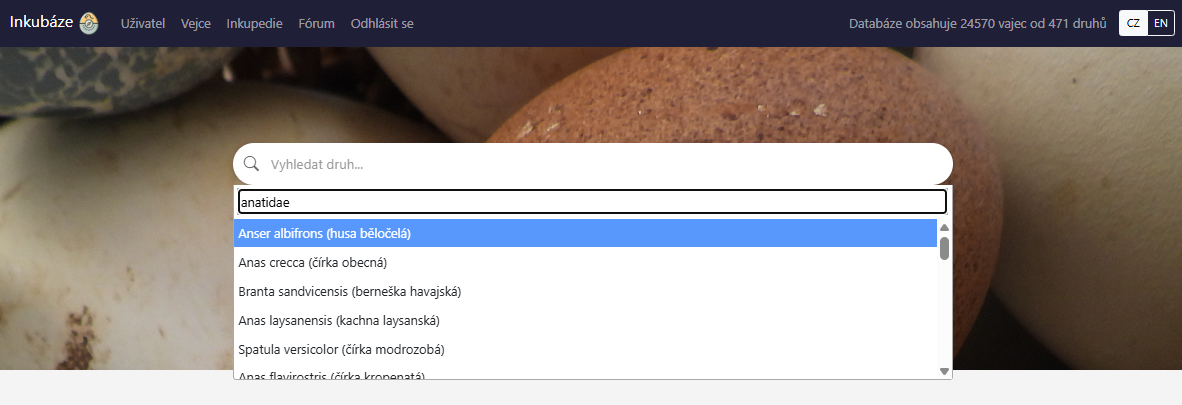
Obr. 2. Vyhledávání druhu.
Po výběru druhu se přímo na úvodní stránce otevře jeho druhová karta. Podle dostupnosti dat může zobrazit:
- vědecký, český a anglický název, čeleď, řád a případně kategorii IUCN,
- fotografii vejce s uvedením autora, pokud je k dispozici,
- počet evidovaných vajec, počet a podíl oplozených vajec a počet i úspěšnost vylíhnutí,
- doporučenou inkubační teplotu a relativní vlhkost, pokud je lze z dostupných dat odvodit,
- souhrn délky, šířky, hmotnosti a objemu vajec a délky inkubační periody,
- úbytek hmotnosti, odděleně pro úspěšně vylíhnutá a odumřelá vejce,
- graf načasování snášení a graf průběhu inkubace, pokud pro jejich vytvoření existuje dostatek dat.
Počty, procenta, rozsahy a grafy jsou souhrnné výstupy vypočtené z již publikovaných vajec připojených institucí. Do těchto souhrnů mohou vstupovat také data institucí v režimu Soukromý, aniž by se zveřejnily jednotlivé primární záznamy. Pokud pro některý výstup nejsou dostatečná data, karta zobrazí chybějící hodnotu nebo důvod, proč výpočet nebylo možné provést.
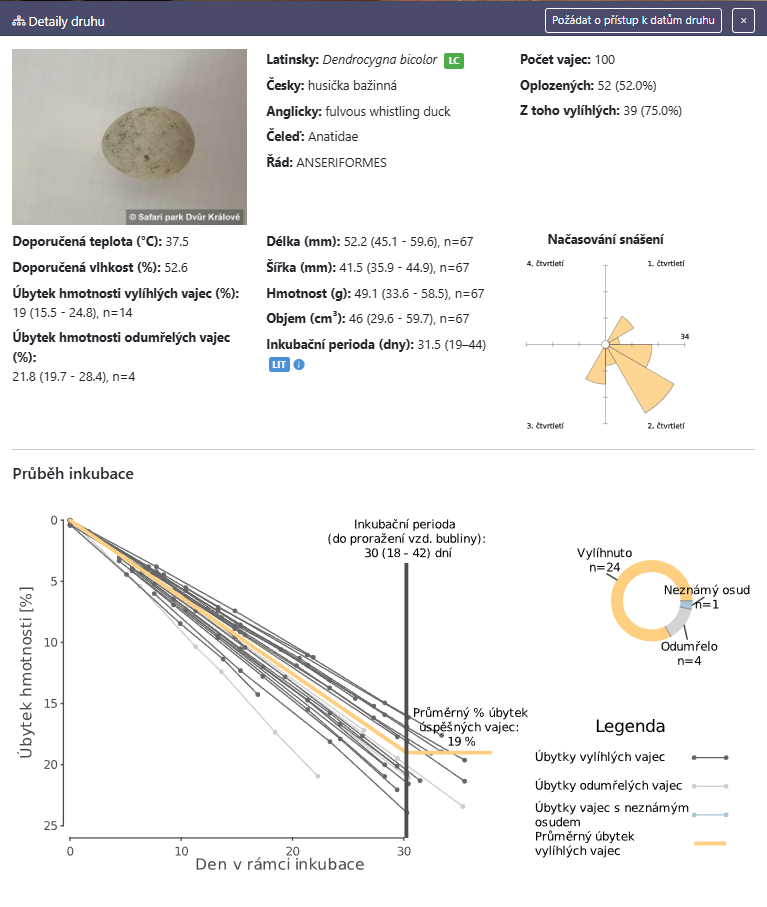
Obr. 3. Druhová karta.
Žádost o přístup k datům druhu. Přihlášenému uživateli se v záhlaví druhové karty zobrazí tlačítko Požádat o přístup k datům druhu. Tlačítko není dostupné nepřihlášenému návštěvníkovi.
Po stisknutí aplikace ověří, zda mají jiné instituce pro vybraný druh již publikovaná vejce v režimu Soukromý nebo Pouze zobrazení. Pokud taková data existují, otevře se formulář, ve kterém žadatel uvede účel jejich použití. Žádost je následně předána správcům příslušných institucí. Odeslání žádosti samo o sobě přístup neuděluje; o zpřístupnění a podmínkách použití rozhoduje původce dat.
5.2 Nástěnka
Nástěnka (záložka “Uživatel”) se objeví ihned po přihlášení a slouží jako rychlý provozní přehled. Zobrazuje zejména:
- identifikaci uživatele s odkazem na správu uživatelského profilu,
- počty vlastních záznamů,
- poslední přidaná nebo upravená vejce,
- poslední otázky v diskuzním fóru,
- příchozí a odchozí žádosti o přístup k datům,
- čekající žádosti o členství v instituci,
- souhrn péče o vejce, konkrétně počet všech, oplozených a vylíhlých vajec a počet známých samic.
Nástěnka je orientační přehled. Detailní informace naleznete v přehledu a kartách vajec, v přehledu a kartách inkubátorů a druhových kartách (Inkupedii).
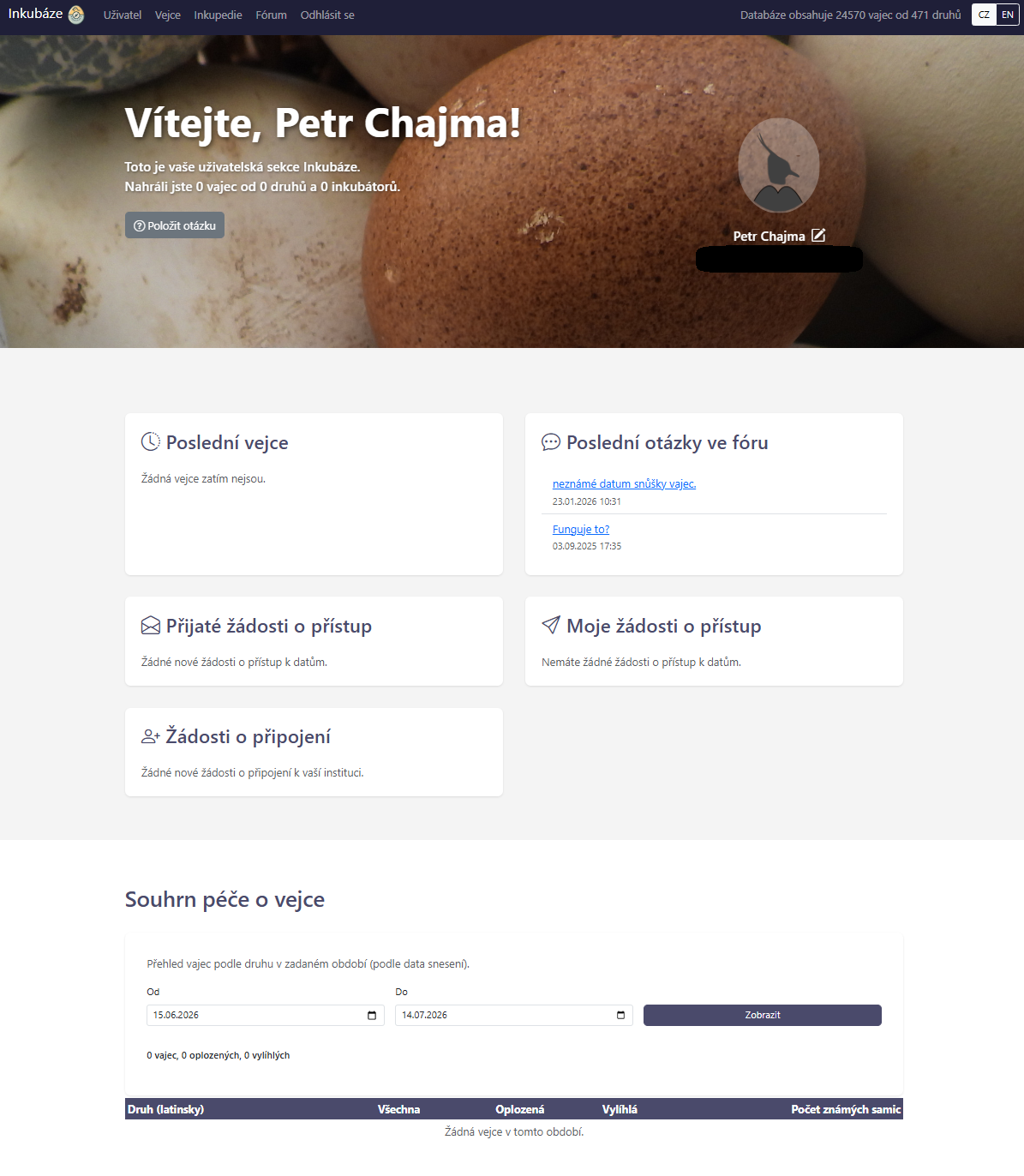
Obr. 4. Nástěnka uživatele.
5.3 Přehled vajec
Přehled vajec (záložka “Vejce”) slouží k vyhledávání, kontrole a hromadné orientaci v datech. Typicky obsahuje záložky pro vlastní vejce a širší databázi vajec, ke které má uživatel oprávnění.
Přehled nabízí pro vejce vlastní instituce zobrazení Základní, Jednoduché, Inkubační a Úplné; pro dostupná vejce ostatních institucí nabízí zobrazení Základní a Úplné. Jednotlivá zobrazení obsahují zejména:
- identifikaci: ID vejce a vědecký název druhu; v úplném přehledu také uživatele u vlastních vajec nebo instituci u ostatních vajec,
- popis: délku, šířku, anomálii, rodičovské identifikátory, snůšku, pořadí vejce a poznámku podle zvoleného zobrazení,
- časové údaje: snesení, nález, začátek chlazení, přirozené a umělé inkubace, přesun do dolíhně, konec inkubace a líhnutí,
- výsledek: oplozenost a důvod ukončení inkubace,
- provozní údaj v základním přehledu: inkubátor z posledního záznamu průběhu,
- odvozené veličiny, časovou řadu vážení a doporučení vlhkosti až na kartě konkrétního vejce; přehled vajec je samostatně nezobrazuje,
- přístup: ikonu institucionálního režimu; odklad publikace se zobrazuje na kartě vlastního vejce, dokud jeho lhůta neuplyne.
Přehled umožňuje vejce filtrovat jak pomocí fulltextového vyhledávání, tak volbou kategorií jednotlivých sloupců, datumů či dokonce pomocí logických dotazů (např. >50 nebo 10-50 ve sloupcích Délka a Šířka). Filtrovaná data lze pomocí tlačítka vpravo dole exportovat do souboru “xlsx”. Pro metodickou interpretaci je rozhodující karta vejce, protože tam je vidět časová řada záznamů a kontext výpočtů.
Barevné kódování identifikátorů vajec
- Zelená: vejce je vedeno jako aktivní, má alespoň jeden použitelný časový údaj a dosud nepřekročilo časový limit odvozený z inkubační periody druhu.
- Červená: vejce nemá evidovaný konečný výsledek, ale od nejstaršího dostupného data překročilo 130 % očekávané inkubační periody druhu. Pokud druhová perioda není k dispozici, použije se náhradní hranice 70 dnů.
- Šedá: vejce je vylíhnuté, má jiný ukončený výsledek (například úhyn, neoplozenost, zmrazení nebo výsledek uvedený v poznámce), případně nemá žádné datum, podle kterého by bylo možné jeho stav časově posoudit.
Červené označení je upozornění na možný neuzavřený nebo zastaralý záznam, nikoli automatický závěr o biologickém stavu vejce. Čas se počítá od nejstaršího dostupného data mezi snesením, sběrem, chlazením, začátkem přirozené nebo umělé inkubace, přesunem do líhně a ukončením inkubace. Výchozí řazení přehledu upřednostňuje aktivní vejce.
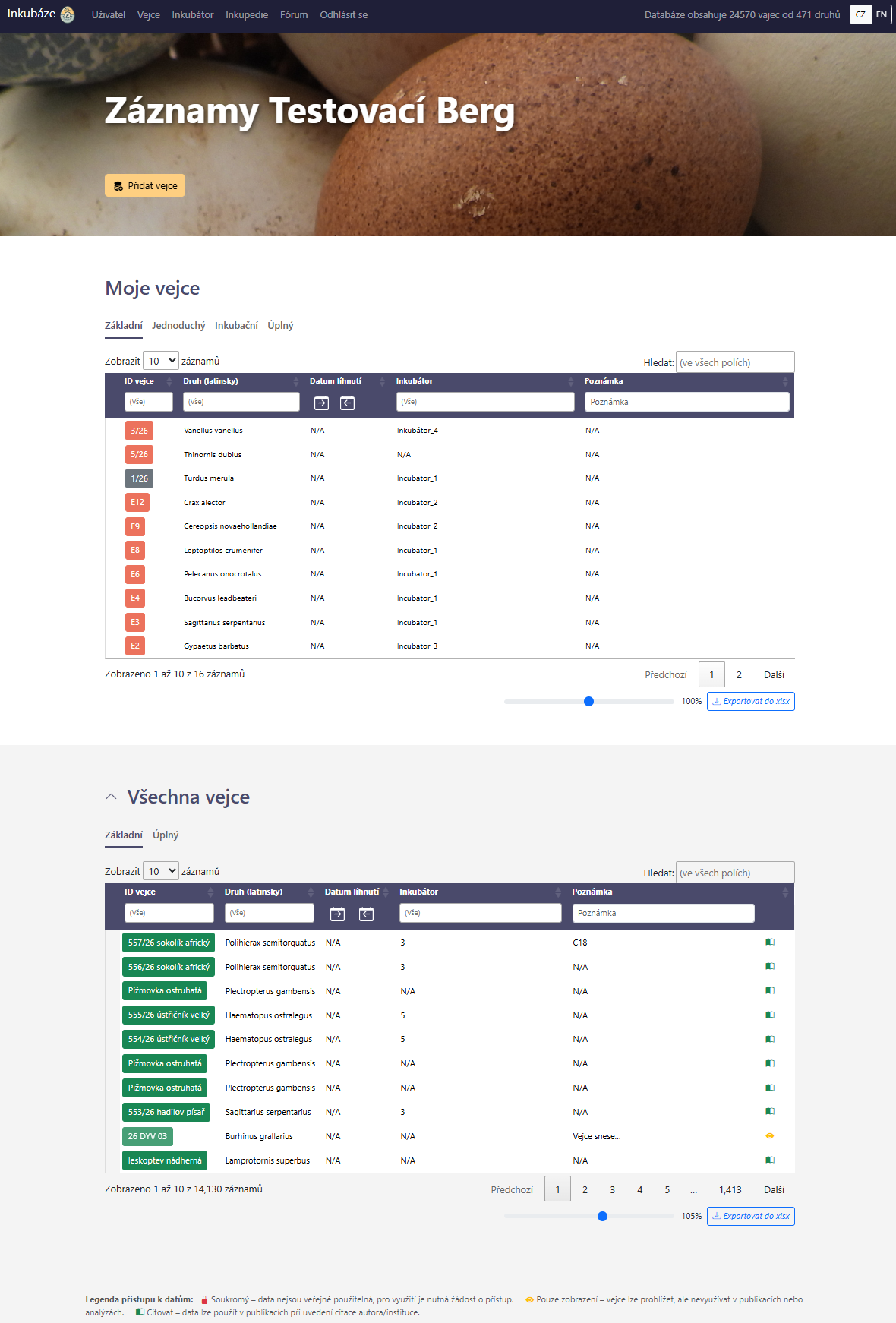
Obr. 5. Přehled vajec.
5.4 Karta vejce
Karta vejce je hlavní pracovní místo pro konkrétní vejce. Zobrazuje:
- základní identifikační údaje,
- vědecký název druhu,
- rodičovské informace, pokud jsou vyplněny,
- rozměry vejce,
- přímo změřenou počáteční hmotnost, pokud existuje vážení přesně v čase snesení; modelový a Hoytův odhad se používají ve výpočtech, ale nejsou zde zobrazeny jako samostatná pole,
- datum snesení, sběru, začátku inkubace a případně líhnutí,
- oplozenost a výsledek inkubace,
- historii průběhu inkubace,
- přiřazení k inkubátoru v jednotlivých časových bodech,
- odvozené charakteristiky dopočítané systémem (např. denní úbytek hmotnosti),
- grafy nebo analytické výstupy, pokud jsou k dispozici,
- doporučení vlhkosti pro konkrétní vejce.
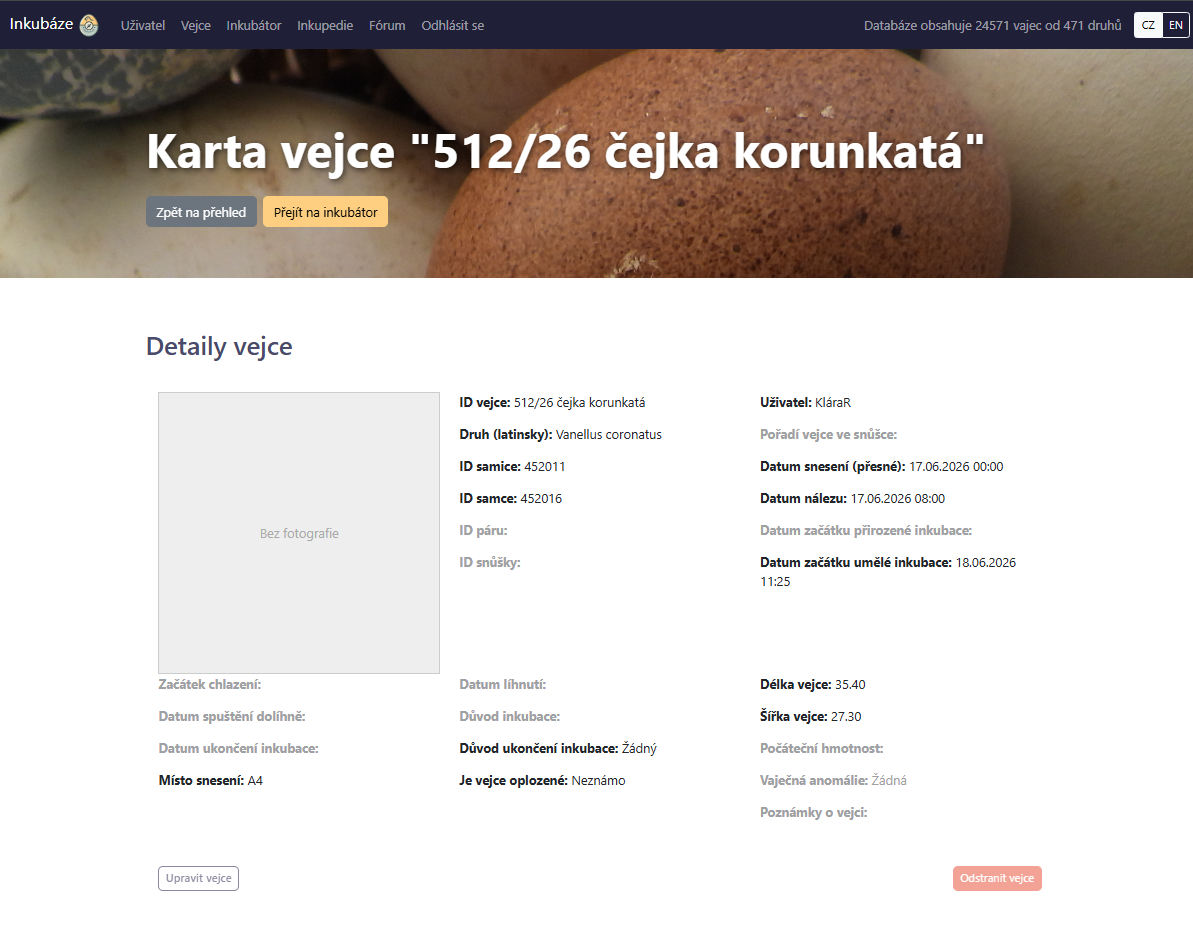
Obr. 6. Popis vejce.
V tabulce průběhu inkubace se evidují zejména:
- datum a čas záznamu,
- aktuální hmotnost vejce, případně hmotnost mláděte,
- označení inkubátoru,
- zda bylo vejce chlazeno nebo prosvěcováno,
- odhadované stádium vývoje,
- kolikrát denně bylo vejce ručně otáčeno,
- naměřená srdeční frekvence embrya,
- typ manipulace s vejcem (např. lepení, propíchnutí),
- důvod inkubace a důvod ukončení inkubace,
- poznámka.
Uživatel do záznamu průběhu zadává pozorované údaje. Denní úbytek, konduktanci, procentuální úbytek a podmínky předchozího období dopočítává aplikace. Teplota a vlhkost se do formuláře průběhu nezadávají; aplikace je odvozuje z časové historie záznamů údržby příslušného inkubátoru.
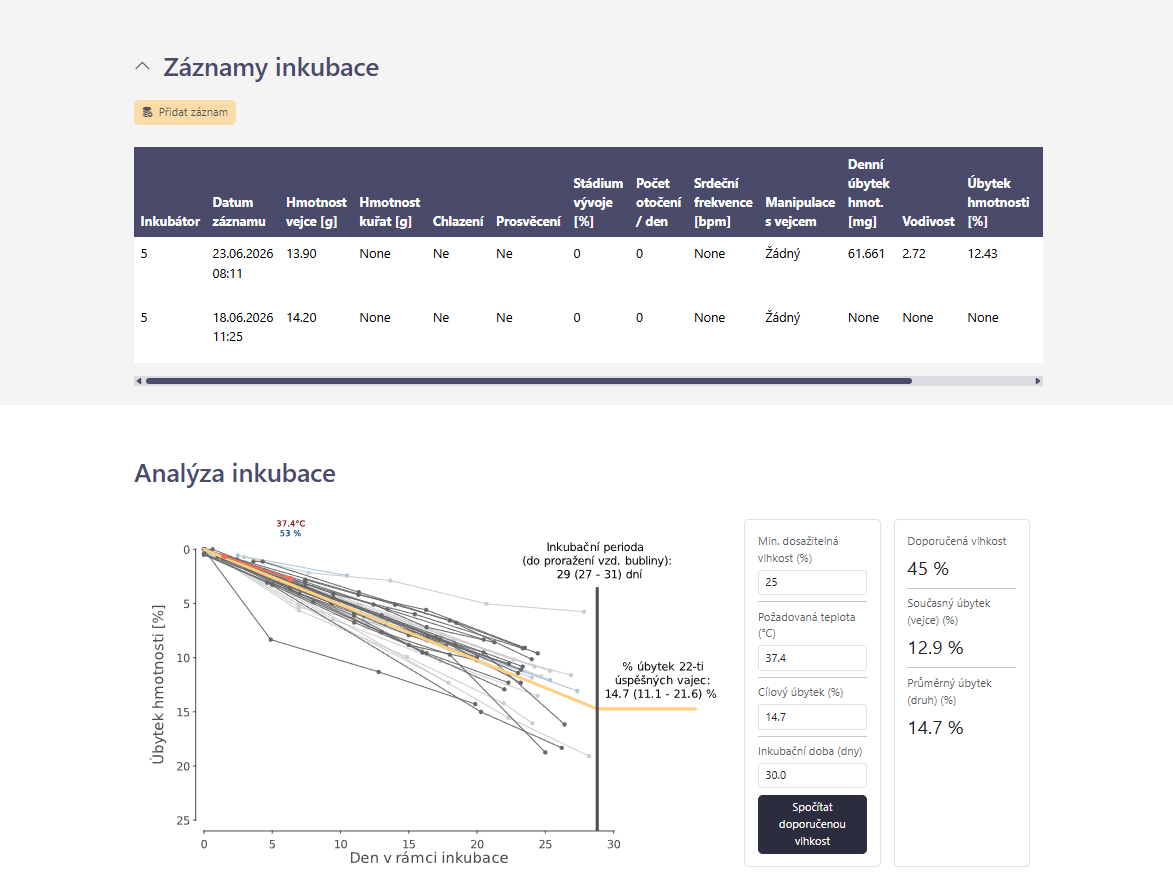
Obr. 7. Průběh inkubace a jeho analýza.
Kdykoliv v průběhu inkubace i po jejím ukončení lze data upravovat. Detaily vejce se upravují pomocí tlačítka “Upravit vejce” umístěného na konci horního bloku, zatímco záznamy průběhu inkubace se upravují tlačítkem “Upravit” umístěném ve sloupci “Akce”, přímo v tabulce záznamů.
5.5 Přehled inkubátorů
Přehled inkubátorů zobrazuje provozní stav zařízení. Pracuje hlavně s těmito daty:
- identifikátor inkubátoru,
- aktuální obsazenost,
- poslední známá teplota,
- poslední známá relativní vlhkost,
- záznamy údržby (počet dní od poslední dezinfekce a od poslední výměny filtru),
- poznámka.
Barevné kódování identifikátorů inkubátorů
- Zelená: inkubátor je podle posledního záznamu údržby v provozu a dezinfekce i výměna filtru jsou zaznamenány v nastavených intervalech.
- Žlutá: inkubátor je v provozu, ale chybí záznam o dezinfekci nebo výměně filtru, případně byl překročen alespoň jeden nastavený interval údržby.
- Šedá: inkubátor je podle posledního záznamu odstaven, nebo nemá žádný záznam údržby, z něhož by bylo možné provozní stav určit.
Pokud vlastní interval není nastaven, aplikace používá výchozí hranici 7 dnů pro dezinfekci a 14 dnů pro výměnu filtru. Barva hodnotí provozní a údržbový stav; sama o sobě neposuzuje vhodnost teploty, vlhkosti ani obsazenost inkubátoru.
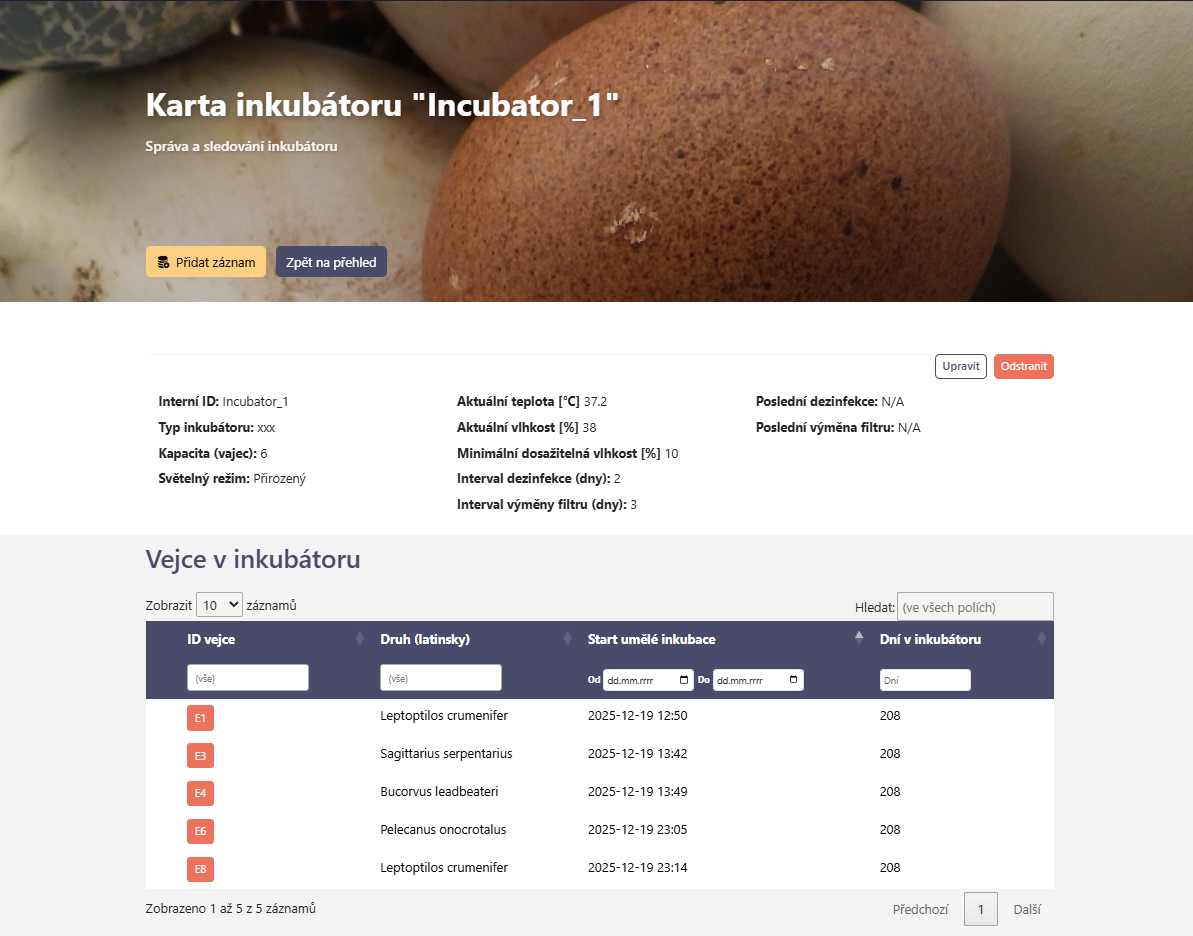
Obr. 8. Přehled inkubátorů.
Kromě těchto veličin se pak při registraci nového inkubátoru zadává:
- typ inkubátoru,
- kapacita vyjádřená jako maximální počet průměrně velkých slepičích vajec; aplikace nerozlišuje jejich velikost, na vhodný ekvivalent si ji musí převést sám uživatel,
- minimální dosažitelná vlhkost (závisí na typu inkubátoru a okolním prostředí),
- interval dezinfekce (nastavení upozornění na nutnou údržbu),
- interval výměny filtru (dtto).
Kapacita je při optimalizaci přesunů chápána jako prostý maximální počet vajec: od kapacity se odečítá počet přiřazených aktivních vajec bez ohledu na jejich rozměry. Minimální dosažitelná vlhkost předvyplňuje dolní mez optimalizace na kartě jednoho inkubátoru. Pokud je vejce nevhodně inkubováno vejce a úbytkem hmotnosti je příliš nízký, nad tuto hranici je vejce stále ještě kompenzovatelné. Pod tuto hranici je již nutné prozkoumat použití technik zvýšení prostupnosti vodních par (např. perforace skořápky). Dávková optimalizace všech inkubátorů používá společnou uživatelskou mez, nastavitelnou ve formuláři (výchozí 0 %), a optimalizace přesunů evidovanou minimální vlhkost inkubátoru nepoužívá.
Tyto parametry je možné zobrazit a upravit v kartě inkubátoru, která se otevře po otevření přehledu a kliknutí na název inkubátoru. Podobně jako u vajec, i zde lze přidávat průběžné záznamy nastavení a údržby inkubátoru. Každý takový záznam obsahuje:
- čas a datum údržby,
- aktuální teplotu a vlhkost,
- nastavení frekvence a doby otáčení za den,
- nastavení frekvence a doby chlazení za den,
- informaci o tom, zda v rámci údržby proběhla dezinfekce, výměna filtru nebo zda byl inkubátor vypnut a odstaven.
Karta inkubátoru navíc umožňuje spouštět optimalizaci vlhkosti pro vejce aktuálně umístěná v inkubátoru. Výstup optimalizace typicky obsahuje:
- navrženou relativní vlhkost,
- počet zahrnutých vajec,
- vejce vyřazená z výpočtu kvůli chybějícím datům,
- vejce, u nichž se odhadovaný konečný úbytek hmotnosti i při nalezené optimální vlhkosti liší od cílového úbytku hmotnosti více než o zvolenou toleranci („prahovou odchylku“),
- velikost těchto odchylek v procentních bodech úbytku hmotnosti.
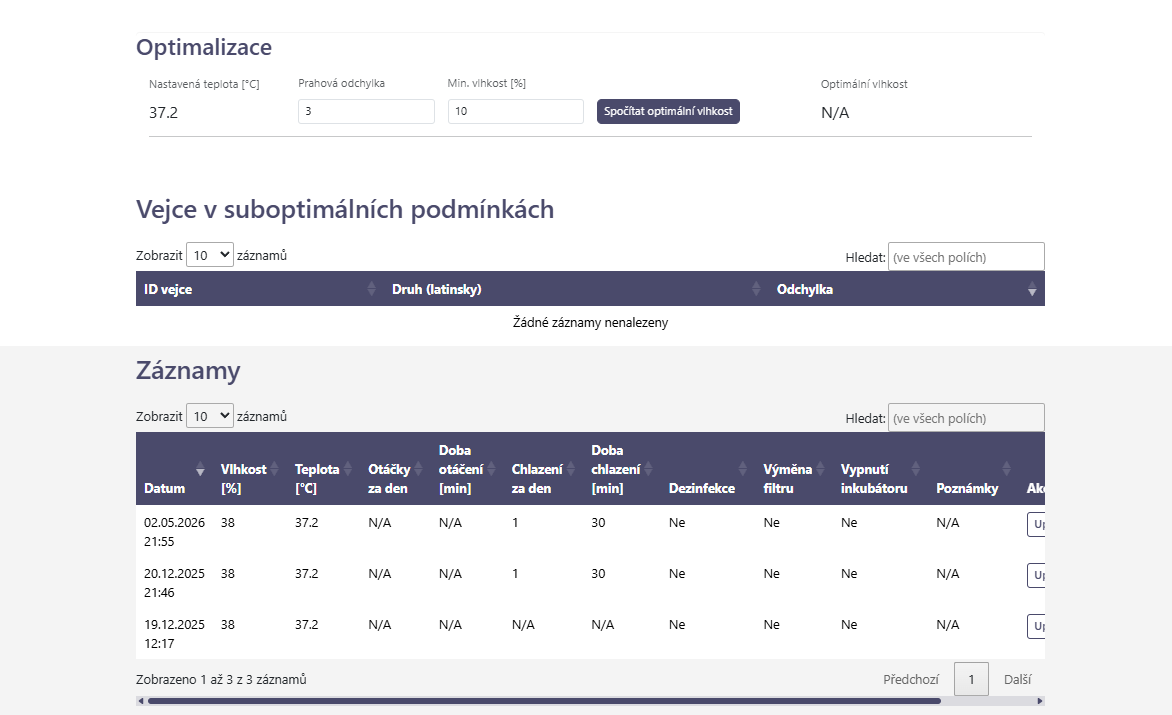
Obr. 9. Optimalizace vlhkosti v inkubátoru a záznamy jeho údržby.
5.6 Optimalizace mezi inkubátory
V přehledu inkubátorů je dostupná možnost optimalizovat vlhkost pro všechny inkubátory najednou. Dávkově se tím spustí stejná procedura, popsaná výše v kartě inkubátoru. Zajímavou možností je ale optimalizace rozmístění vajec, dostupná ve vedlejším panelu stejného okna.
Optimalizace rozmístění porovnává vejce napříč běžícími inkubátory. Algoritmus nejprve ponechá vejce, jejichž extrapolovaný úbytek hmotnosti je v zadané toleranci cíle. Ostatní vejce zpracovává postupně; přednost mají vejce s nejmenším počtem vhodných inkubátorů. Pro každé z nich vybere z inkubátorů se stejnou teplotou a volnou kapacitou ten, jehož vlhkost je nejblíže individuální potřebě vejce a představuje zlepšení proti současnému umístění. Následně zkouší, zda lze výsledek dále zlepšit vzájemnou výměnou dvojic vajec. Výstupem jsou návrhy přesunů a zlepšení vyjádřené v procentních bodech jako pokles mediánu absolutních odchylek očekávaného a cílového úbytku hmotnosti. Fyzický přesun posuzuje a provádí uživatel.
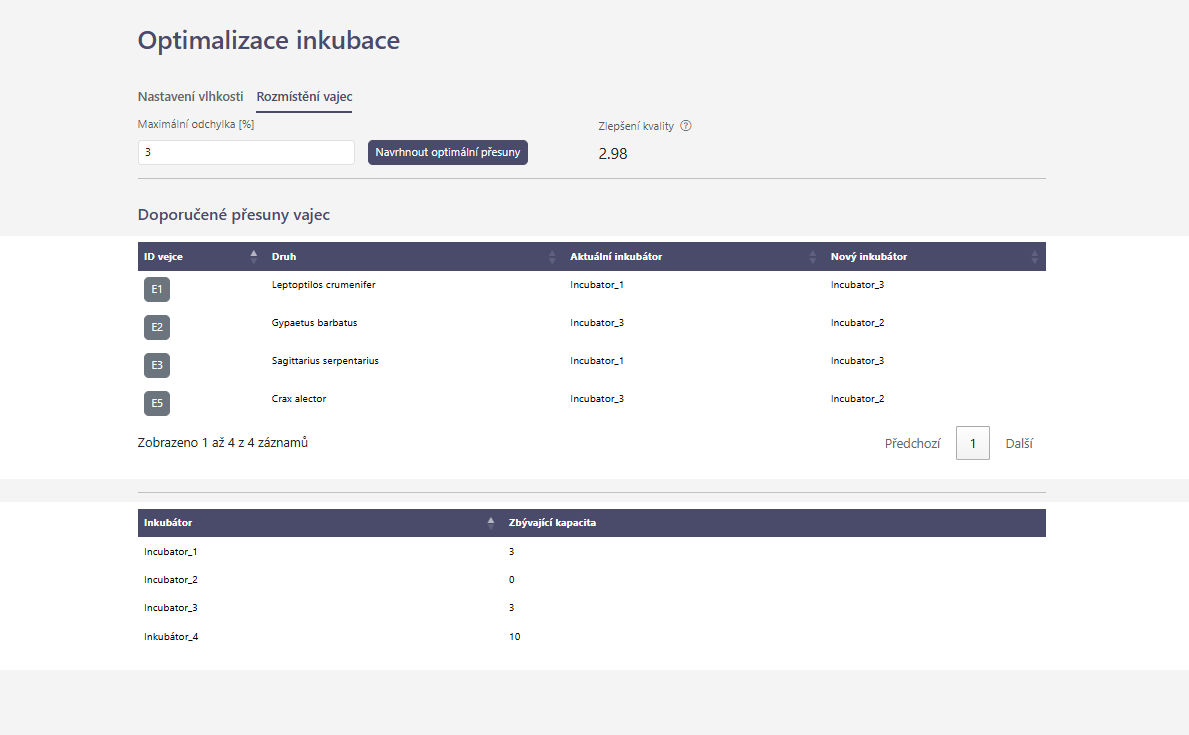
Obr. 10. Optimalizace rozmístění vajec mezi inkubátory.
5.7 Inkupedie a druhové karty
Inkupedie je inkubační encyklopedie, jež umožňuje pohodlně listovat v druhových kartách, přehledně tříděných dle jejich taxonomické příslušnosti. Zobrazuje dostupná druhová inkubační data a měla by sloužit k nahlédnutí pod pokličku jejich inkubačních zvyklostí a představovat základní dokument při tvorbě strategie líhnutí. Zobrazuje:
- vědecký název,
- český nebo anglický název, pokud je k dispozici,
- taxonomické zařazení do čeledí a řádu,
- zařazení do kategorie červeného seznamu IUCN,
- počty evidovaných vajec,
- počty a procentuální zastoupení oplozených a vylíhnutých vajec,
- doporučenou teplotu inkubace (aritmetický průměr teplot předchozího období u záznamů vajec označených jako vylíhnutá),
- doporučená vlhkost v inkubátoru (výpočet optimální vlhkosti na začátku inkubace pro doporučenou teplotu),
- vážený průměr úbytku hmotnosti vylíhlých a odumřelých vajec (váhou je délka sledovaného období),
- aritmetický průměr rozměrů a počáteční hmotnosti vajec,
- aritmetický průměr objemu vajec,
- referenční inkubační periodu z literatury (databáze Birdbase; Şekercioğlu et al., 2025) a inkubační dobu odhadnutou z dat Inkubáze.
Inkupedie kombinuje referenční údaje (taxonomické zařazení, kategorii červeného seznamu IUCN a referenční inkubační periodu) a vypočtená data (vše ostatní). Vypočtená data vznikla výhradně z publikovaných záznamů v aplikaci. Kromě popsaných informací obsahuje inkupedie grafy načasování snášení a průběhu inkubace všech zveřejněných vajec. Listovat mezi jednotlivými stránkami Inkupedie lze pomocí šipek na klávesnici, případně šipek po stranách hlavního panelu aplikace.
6. Jaká data vstupují do výpočtů
Výpočty mají varianty podle dostupnosti vstupů. Aplikace používá pevně stanovené pořadí zdrojů a náhradních hodnot. Například ve výpočtu optimální vlhkosti je nutné znát cílový úbytek hmotnosti úspěšně vylíhlých vajec. Pokud uživatel nezadá vlastní hodnotu, odhaduje se z druhového váženého průměru úspěšných vajec. Pokud chybí i ten, vychází z pevné hodnoty 15 %. Vstupy jednotlivých výpočtů shrnuje následující tabulka:
Tab. 1. Veličiny a data potřebná k výpočtům.
| Počítaná veličina | Hlavní vstupy |
|---|---|
| Objem vejce | délka a šířka vejce |
| Počáteční hmotnost vejce | alespoň dvě použitelná vážení a datum snesení (odhad z průběžného vážení); délka a šířka (Hoytův vzorec) |
| Denní úbytek hmotnosti | alespoň dvě vážení s odstupem alespoň 12 hodin |
| Podíl uplynulé inkubační periody (%) | datum snesení nebo začátku inkubace, inkubační perioda |
| Konduktance (vodivost skořápky pro vodní páru) | denní úbytek hmotnosti, teplota, vlhkost |
| Doporučená vlhkost | aktuální a počáteční hmotnost, konduktance konkrétního vejce, cílový úbytek hmotnosti, inkubační perioda, uplynulý inkubační čas a zadaná teplota |
| Optimalizace inkubátoru | aktivní vejce, poslední hmotnost, počáteční hmotnost, inkubační čas a perioda, cílový úbytek hmotnosti, denní úbytek hmotnosti a předchozí podmínky; druhový průměr konduktance může být náhradním vstupem |
| Optimalizace přesunů | běžící inkubátory s teplotou, vlhkostí a kapacitou; aktivní vejce s hmotností, počáteční hmotností, inkubačním časem a periodou, cílovým úbytkem hmotnosti a podmínkami pro odvození individuální vlhkosti |
7. Přepočty a aktualizace statistik
Aplikace přepočítává hodnoty po založení nebo úpravě vejce a po přidání nebo úpravě záznamu průběhu inkubace. Výpočty probíhají mimo samotný formulář a mohou se projevit s krátkým zpožděním.
7.1 Přepočet jednotlivého vejce
Pro konkrétní vejce se počítají zejména:
- objem vejce,
- odhad hmotnosti podle rozměrů,
- odhad počáteční hmotnosti z průběhu vážení,
- denní úbytek hmotnosti,
- podíl uplynulé inkubační periody v procentech,
- konduktance,
- procentuální úbytek hmotnosti extrapolovaný na efektivní inkubační okno,
- doporučená vlhkost,
7.2 Přepočet druhové statistiky
Druhová statistika se počítá z vajec přiřazených ke kanonickému druhu. Pokud existují synonymní názvy nebo poddruhové vazby svázané s hlavním druhem, statistika je slučuje podle interního druhového identifikátoru. Taxonomické členění použité v aplikaci je založeno na “The Clements Checklist of Birds of the World” (Clements et al., 2025), rozšířeném o synonyma a vybrané hybridní druhy.
Z uživatelsky dostupných nastavení může zařazení do druhové statistiky dočasně omezit odložená publikace vejce. Takové vejce zůstává dostupné členům vlastní instituce, ale do stanoveného data se nezobrazuje ostatním institucím a neovlivňuje data v Inkupedii. Po uplynutí odkladu se začne uplatňovat režim sdílení nastavený pro instituci.
8. Biometrické výpočty vejce
Značení použité ve vzorcích
Ve vzorcích se používá jednotné značení:
- L = délka vejce v mm,
- B = šířka vejce v mm,
- V = objem vejce v cm3,
- W0 = počáteční hmotnost vejce v g,
- Wt = aktuální hmotnost vejce v g,
- Wt−1 = předchozí hmotnost vejce v g,
- Δt = časový rozdíl mezi dvěma měřeními ve dnech,
- IP = inkubační perioda ve dnech,
- IPeff = efektivní inkubační perioda,
- tink = aktuální inkubační čas ve dnech,
- T = teplota ve °C,
- RH = relativní vlhkost v procentech,
- Psat(T) = tlak syté vodní páry při teplotě T,
- G = konduktance vejce,
- C = cílový úbytek hmotnosti v procentech.
8.1 Objem vejce
Objem se počítá z délky a šířky vejce:
\[V = 0,51 \cdot \frac{L \cdot B^{2}}{1000}\]
Výsledek je přibližný objem v cm*3*. Koeficient 0,51 vychází z běžného empirického vztahu pro vejce ptáků.
8.2 Odhad hmotnosti podle Hoyta
Pokud není k dispozici spolehlivá počáteční hmotnost, aplikace používá odhad podle rozměrů:
\[W_{Hoyt} = 0,54 \cdot \frac{L \cdot B^{2}}{1000}\]
U konkrétního vejce může být méně přesný než skutečné vážení krátce po snesení, i než odhad z průběžného vážení (viz dále).
8.3 Odhad počáteční hmotnosti z průběžného vážení
Při alespoň dvou záznamech hmotnosti aplikace odhaduje počáteční hmotnost z časové řady. Pokud existuje vážení přesně v nulovém inkubačním čase, použije jeho hmotnost. Jinak k nejčasnějšímu použitelnému vážení přičte průměrný denní úbytek násobený jeho inkubačním časem.
Pravidla:
- je potřeba alespoň dvojice použitelných vážení a časový základ z data snesení, začátku umělé inkubace nebo začátku přirozené inkubace,
- denní úbytky se počítají jen z dvojic vzdálených alespoň 12 hodin a skoky přes 60 % hmotnosti se ignorují,
- odhad se omezí zdola nejvyšší naměřenou hmotností; pokud je nižší, použije se dostatečně vysoký Hoytův odhad, jinak se použije nejvyšší měření a časová osa se posune tak, aby toto měření odpovídalo dni 0.
Odhad z průběžného vážení závisí na zvoleném časovém základu a kvalitě vážení. Pro individuální výpočty má přednost před Hoytovým odhadem z rozměrů vejce. Skutečná počáteční hmotnost, rozpoznaná při přesné časové shodě některého vážení s uloženým datem a časem snesení, má před predikovanou a Hoytovou hodnotou vždy přednost. Pokud nelze určit ani jednu z těchto hodnot, výpočty vyžadující počáteční hmotnost se neprovedou.
9. Inkubační čas a inkubační perioda
9.1 Inkubační čas konkrétního vejce
Inkubační čas je počet dnů od výchozího data do konkrétního záznamu průběhu. Výchozí datum se vybírá v tomto pořadí:
- datum snesení,
- datum začátku umělé inkubace (pole „Začátek umělé inkubace“),
- datum začátku přirozené inkubace (pole „Začátek přirozené inkubace“), pokud není vyplněno datum snesení ani začátek umělé inkubace.
Toto pořadí platí pro časovou osu konkrétního vejce používanou při automatickém přepočtu (vždy po přidání nebo úpravě nových údajů), individuálním doporučení vlhkosti a obou optimalizacích. Je-li datum snesení vyplněno, má přednost i tehdy, když je ve formuláři označeno jako odhad. Automatický přepočet vyžaduje, aby alespoň jeden záznam průběhu připadal na výchozí datum nebo na pozdější dobu. Pokud všechny záznamy předcházejí výchozímu datu, aplikace inkubační čas neurčí. Výpočty doporučení a optimalizací však stejnou kontrolu neprovádějí, proto může chybně zadané budoucí výchozí datum vytvořit záporný inkubační čas a zkreslit výsledek.
Uvedené tři možnosti proto nejsou univerzálním pravidlem pro všechny výpočty. Denní úbytek hmotnosti používá pouze datum a čas dvojice vážení. Pozorovaná druhová inkubační perioda striktně vyžaduje datum snesení označené jako přesné a datum líhnutí; začátek umělé ani přirozené inkubace je nenahrazuje. Druhový souhrn úbytku hmotnosti používá datum snesení, a pokud chybí, datum nálezu; začátky inkubace nepoužívá a samotný výpočet nekontroluje přesnost data snesení. Sezonnost snášky používá datum snesení, jinak datum nálezu. Skutečná počáteční hmotnost se rozpozná jen při přesné shodě času vážení s uloženým časem snesení.
9.2 Inkubační perioda druhu
Inkubační perioda se používá k určení stádia vývoje, k výpočtům úbytku hmotnosti a při optimalizacích. Aplikace ji dohledává v tomto pořadí:
- uživatelem zadaná hodnota v analýze inkubace v kartě vejce,
- referenční minimum a maximum převzaté z databáze Birdbase (Şekercioğlu et al., 2025)
- odhad z dat zadaných do Inkubáze,
- medián druhových period v rámci stejné čeledi,
- při absenci všeho zmíněného v analýze inkubace v kartě vejce, přednastavená hodnota 30 dnů.
Pokud je použito referenční minimum i maximum, používá se jejich průměr:
\[IP = \frac{IP_{\min} + IP_{\max}}{2}\]
U optimalizací se používá 96 procent inkubační periody:
\[IP_{eff} = 0,96 \cdot IP\]
Smyslem je modelovat hlavní období vodního úbytku do závěrečné fáze líhnutí.
9.3 Odhad inkubační periody z dat Inkubáze
Odhad inkubační periody z dat inkubáze, neboli pozorovaná inkubační perioda, se počítá jako rozdíl data líhnutí a přesného data snesení. Kód přitom neověřuje důvod ukončení inkubace, takže rozhoduje existence obou dat (což automaticky znamená, že se vejce vylíhlo) a příznak přesnosti data snesení, nikoli uživatelem zadaná hodnota Vylíhlé:
\[IP_{obs} = d_{hatch} - d_{lay}\]
Do databáze se ukládá medián pozorovaných period, nikoli prostý průměr. Dále se ukládá minimum a maximum. Vejce bez přesného data snesení se pro tento údaj nepoužívají, protože by zkreslovala délku inkubace.
10. Denní úbytek hmotnosti
Denní úbytek hmotnosti ukazuje, kolik hmotnosti vejci ubude za den. Počítá se z rozdílu mezi dvěma váženími:
\[\Delta m_{day} = \frac{W_{t - 1} - W_{t}}{\Delta t} \cdot 1000\]
Metodická pravidla:
- předchozí vážení musí být alespoň 12 hodin před aktuálním,
- pokud je rozdíl hmotnosti extrémní, například skok o více než 60 %, považuje se za chybu měření a nepoužije se,
- záporný úbytek se nastavuje na 0, protože jde nejčastěji o šum, chybu vážení nebo rozdíl podmínek měření,
- čím pravidelnější a přesnější vážení, tím stabilnější výsledek.
Denní úbytek je jeden z nejdůležitějších vstupů pro odhad konduktance, doporučenou vlhkost a optimalizaci.
11. Teplota a vlhkost předchozího období
Pro každý záznam průběhu od druhého záznamu dále aplikace odhaduje průměrnou teplotu a vlhkost v intervalu od předchozího záznamu. Tyto veličiny uživatel do formuláře průběhu nezadává.
- Zdrojem jsou záznamy údržby inkubátoru platné v daném časovém intervalu.
- Interval se rozdělí v okamžicích změn nastavení a pro každý dílčí úsek se použije poslední nastavení známé na jeho začátku.
- Pokud chybí dostatečná historie nastavení, odvozená teplota nebo vlhkost zůstane prázdná a navazující výpočty mohou selhat
Pokud jsou v inkubátoru mezi dvěma záznamy vážení změny nastavení, aplikace počítá časově vážený průměr. To znamená, že nastavení platné 20 hodin ovlivní průměr více než nastavení platné 2 hodiny.
Obecně:
\[\bar{x} = \frac{\sum_{j = 1}^{n}x_{j} \cdot \Delta t_{j}}{\sum_{j = 1}^{n}\Delta t_{j}}\]
Kde xj je teplota nebo vlhkost v dílčím časovém úseku a Δtj je délka tohoto úseku.
Příklad:
- 18 hodin byla vlhkost 45 %,
- 6 hodin byla vlhkost 60 %,
- časově vážený průměr je (18 × 45 + 6 × 60) / 24 = 48,75 %.
Tento princip je důležitý pro výpočet konduktance. Vlhkost z jednoho okamžiku by nemusela odpovídat skutečným podmínkám mezi dvěma váženími.
12. Konduktance vejce
Konduktance vyjadřuje propustnost skořápky vejce pro vodní páru. Zjednodušeně popisuje, jak rychlý úbytek hmotnosti nastává při dané teplotě a vlhkosti.
Výpočet vychází z:
- denního úbytku hmotnosti v mg/den,
- teploty,
- relativní vlhkosti,
- tlaku syté vodní páry při dané teplotě.
Nejprve se podle teploty spočítá tlak syté vodní páry. Potom se určí rozdíl mezi tlakem vodní páry na povrchu vejce a v inkubátoru. Zjednodušený zápis:
\[P_{inc} = P_{sat}(T) \cdot \frac{RH}{100}\]
\[\Delta P = P_{sat}(T) - P_{inc} = P_{sat}(T) \cdot \left( 1 - \frac{RH}{100} \right)\]
\[G = \frac{\Delta m_{day}}{\Delta P} = \frac{\Delta m_{day}}{P_{sat}(T) \cdot \left( 1 - \frac{RH}{100} \right)}\]
Kde:
- G je konduktance,
- Psat(T) je tlak syté vodní páry při teplotě T,
- Pinc je parciální tlak vodní páry v inkubátoru,
- ΔP je rozdíl parciálních tlaků,
- RH je relativní vlhkost v procentech.
Použité jednotky jsou mg vody na Torr a den. Vyšší konduktance znamená, že vejce při stejných podmínkách vykazuje rychlejší úbytek hmotnosti.
Pro spolehlivý výpočet konduktance je nutné mít:
- alespoň dvě smysluplná vážení,
- čas mezi váženími,
- teplotu předchozího období,
- vlhkost předchozího období.
Při optimalizaci inkubátoru lze chybějící konduktanci odvozenou z posledního úseku nahradit aritmetickým druhovým průměrem, což sice nepřinese maximálně přesné doporučení, ale představuje obecně lepší alternativu, než vejce zcela vyřadit. Individuální doporučení vlhkosti však vyžaduje konduktanci odvozenou z průběhu konkrétního vejce.
13. Úbytek hmotnosti a cílový úbytek
Úbytek hmotnosti se v inkubaci používá jako zástupný ukazatel množství odpařené vody. Aplikace pracuje s aktuálním, extrapolovaným a cílovým úbytkem hmotnosti.
13.1 Aktuální úbytek
Aktuální úbytek vychází z rozdílu mezi počáteční a aktuální hmotností:
\[M_{lost} = \left( W_{0} - W_{t} \right) \cdot 1000\]
Kde W0 je počáteční hmotnost a Wt aktuální hmotnost.
13.2 Extrapolovaný úbytek v procentech
Z denního úbytku lze odhadnout, jakého procentuálního úbytku hmotnosti by vejce dosáhlo za efektivní inkubační období:
\[L_{rate} = \frac{\Delta m_{day} \cdot 0,001}{W_{0}} \cdot IP_{eff} \cdot 100\]
Tato hodnota neříká, jaký byl dosavadní celkový úbytek hmotnosti vejce, ale jaký úbytek odpovídá aktuálnímu tempu přepočtenému na efektivní délku inkubace.
13.3 Cílový úbytek
Cílový úbytek je procento, ke kterému se má vejce přiblížit do konce efektivního inkubačního okna. Aplikace jej bere v tomto pořadí:
- hodnota zadaná uživatelem v doporučení vejce,
- průměrný úbytek úspěšně vylíhnutých vajec daného druhu,
- 15 %.
15 % je pouze obecná, v chovech často používaná, výchozí hodnota.
14. Doporučená vlhkost pro konkrétní vejce
Doporučení vlhkosti lze spočítat v analýze inkubace v kartě vejce. Cílem je odpovědět na otázku:
Jaká relativní vlhkost by při zadané teplotě měla vést k tomu, aby vejce od aktuálního stavu dosáhlo cílového úbytku hmotnosti?
14.1 Vstupy doporučení
Uživatel může zadat:
- minimální povolenou vlhkost,
- požadovanou teplotu,
- cílový úbytek hmotnosti,
- vlastní inkubační periodu.
Pokud hodnoty nezadá, aplikace použije následující výchozí hodnoty:
- teplota ve formuláři: poslední nastavení aktuálního inkubátoru, jinak poslední dopočtená teplota průběhu, a pokud chybí i ta, 37,2 °C,
- minimální dosažitelná vlhkost v inkubátoru: 25 %, uživatel ji může změnit v rozsahu 0–100 %,
- cílový úbytek hmotnosti: druhový průměrný úbytek hmotnosti úspěšných vajec, jinak 15 %,
- inkubační perioda: podle pořadí popsaného v kapitole o inkubační periodě.
14.2 Výpočet doporučené vlhkosti
Postup výpočtu:
- Určí se počáteční hmotnost W0.
- Vezme se aktuální hmotnost Wt.
- Spočítá se dosavadní úbytek hmotnosti vejce.
- Spočítá se celkový cílový úbytek hmotnosti v mg.
- Rozdíl mezi cílovým a dosavadním úbytkem hmotnosti určuje, jaký další úbytek hmotnosti je ještě požadován.
- Určí se počet zbývajících dnů do konce efektivní inkubační periody.
- Ze zbývajícího požadovaného úbytku hmotnosti se spočítá potřebný denní úbytek hmotnosti.
- Podle konduktance se určí potřebný rozdíl parciálních tlaků vodní páry.
- Z rozdílu tlaků a teploty se odvodí relativní vlhkost.
Zjednodušený zápis:
\[M_{target} = W_{0} \cdot \frac{C}{100} \cdot 1000\]
\[M_{lost} = \left( W_{0} - W_{t} \right) \cdot 1000\]
\[M_{rem} = M_{target} - M_{lost}\]
\[D_{rem} = IP_{eff} - t_{inc}\]
\[\Delta m_{req} = \frac{M_{rem}}{D_{rem}}\]
\[\Delta P_{req} = \frac{\Delta m_{req}}{G}\]
\[RH_{rec} = \frac{P_{sat}(T) - \Delta P_{req}}{P_{sat}(T)} \cdot 100\]
Kde Mtarget je cílový celkový úbytek hmotnosti, Mlost dosavadní úbytek hmotnosti, Mrem zbývající požadovaný úbytek hmotnosti, Drem zbývající počet dnů a RHrec doporučená relativní vlhkost.
14.3 Omezení výsledku
Výsledek se omezuje praktickými hranicemi:
- pokud výpočet vyjde pod uživatelem zadanou minimální vlhkost, výsledek je označen jako menší než minimální vlhkost,
- pokud výpočet vyjde nad 100 %, horní hranicí je 100 %,
- pokud chybějí klíčová data, doporučení se nevypočítá a aplikace zobrazí důvod.
14.4 Typické důvody, proč doporučení nejde spočítat
Doporučení nemusí vzniknout, pokud chybí:
- záznam průběhu inkubace,
- alespoň dva záznamy hmotnosti pro běžný automatický přepočet,
- aktuální hmotnost,
- datum snesení nebo začátku inkubace,
- inkubační perioda,
- počáteční hmotnost,
- konduktance,
- teplota nebo vlhkost předchozího období,
- cílový úbytek hmotnosti.
Při řešení problému je nejvhodnější nejprve zkontrolovat kartu vejce, doplnit vážení, datum snesení nebo začátku inkubace a záznamy údržby inkubátoru.
15. Druhové statistiky
Druhové statistiky jsou metodicky zásadní, protože se používají jako referenční zdroj pro Inkupedii, doporučené hodnoty a výchozí hodnoty v dalších výpočtech.
15.1 Počty vajec a výsledků
U druhu se počítá:
- celkový počet vajec,
- počet oplozených vajec,
- počet neoplozených vajec,
- počet vylíhnutých vajec,
- počet odumřelých vajec.
Oplozené vejce je automaticky rozpoznáno zejména podle pole oplozenosti nebo podle existence data líhnutí. Vylíhnuté vejce je vejce s výsledkem “Vylíhlé” nebo s datem líhnutí, pokud není záznam ukončen jiným jasným důvodem. Odumřelé vejce je vejce s důvodem ukončení “Odumřelé”. Neoplozené vejce odpovídá důvodu ukončení “Neoplozené”.
15.2 Rozměry a hmotnost
Z publikovaných vajec, u nichž již uplynul případný odklad, se počítají:
- průměrná šířka,
- minimální a maximální šířka,
- průměrná délka,
- minimální a maximální délka,
- průměrná hmotnost,
- minimální a maximální hmotnost.
Rozměry se sumarizují aritmetickým průměrem, minimem a maximem. Průměrná hmotnost se počítá z počátečních hmotností.
15.3 Inkubační perioda
Druhová inkubační perioda má dva zdroje:
- referenční data z databáze Birdbase (Şekercioğlu et al., 2025),
- pozorovaná data z vajec v aplikaci.
Pozorovaná perioda se vypočte ze všech vajec s přesným datem snesení a datem líhnutí jako rozdíl těchto dat. Sumarizována je jako medián, minimum a maximum.
15.4 Měsíc snášky
Aplikace může zobrazit nebo počítat sezonnost snášky. Používá:
- datum snesení,
- pokud chybí, datum sběru.
Výstupem je kruhový sloupcový graf snášek podle měsíců. Tento údaj je orientační a závisí na úplnosti zadávání dat.
15.5 Druhový úbytek hmotnosti úspěšných a neúspěšných vajec
Pro druh se samostatně vyhodnocuje úbytek hmotnosti u:
- úspěšně vylíhnutých vajec,
- odumřelých vajec,
Do výpočtu vstupují pouze vejce s definovaným výsledkem a dostatečným počtem průběžných vážení. Aplikace vyžaduje zejména:
- alespoň dvě vážení,
- validní počáteční a poslední hmotnost,
- sledované období alespoň 7 dnů, počítané od přesného data snesení, nebo při jeho absenci od data nálezu,
- smysluplnou inkubační periodu.
Zjednodušený přepočet úbytku hmotnosti:
\[L_{species} = \left( \frac{W_{0} - W_{last}}{W_{0}} \cdot 100 \right) \cdot \frac{IP_{eff}}{D_{obs}}\]
Tím se úbytek hmotnosti ve sledovaném úseku přepočte na 96 procent referenční nebo pozorované inkubační periody. Vyřazují se nečíselné a záporné výsledky, hodnoty nad 40 procent, záznamy s problematickým časovým zarovnáním a vejce bez měřitelného poklesu hmotnosti. U vylíhnutých vajec se navíc vyřazují extrapolované úbytky hmotnosti do 1 procenta a průběhy s celkovým pozorovaným úbytkem hmotnosti nad 30 procent.
Průměrný úbytek hmotnosti se počítá váženě podle délky sledovaného období. Delší kvalitní záznam má tedy větší váhu než krátký úsek.
15.6 Doporučená druhová teplota
Doporučená teplota druhu je aritmetický průměr teploty předchozího období ze všech dostupných záznamů vajec, jejichž důvod ukončení je Vylíhlé. Nejde o medián ani o průměr po jednotlivých vejcích; vejce s více použitelnými záznamy přispívá více hodnotami.
Tato hodnota není univerzální biologické optimum. Je to popis podmínek, při kterých se v dostupných datech podařilo vejce daného druhu líhnout.
15.7 Doporučená druhová vlhkost
Doporučená druhová vlhkost se nebere jako prostý průměr naměřených vlhkostí. Počítá se z modelu úbytku hmotnosti s použitím:
- průměrné hmotnosti druhu,
- mediánu pozorované inkubační periody druhu,
- průměrného úbytku hmotnosti u úspěšných vajec,
- doporučené druhové teploty,
- aritmetického průměru konduktance ze všech dostupných záznamů průběhu daného druhu.
Metodicky odpovídá otázce:
Jaká relativní vlhkost by u průměrného vejce daného druhu při doporučené teplotě vedla k průměrnému úbytku hmotnosti úspěšných vajec?
Pokud výpočet vyjde pod 20 %, aplikace ukládá hodnotu reprezentující “méně než 20 %”. Pokud výsledek vyjde mimo smysluplný rozsah nebo chybí vstupy, druhová doporučená vlhkost se neuloží.
16. Optimalizace vlhkosti v jednom inkubátoru
Optimalizace inkubátoru hledá jednu vlhkost, která je kompromisem pro všechna zahrnutá aktivní vejce v daném inkubátoru.
16.1 Co se optimalizuje
Teplota je v tomto režimu pevná. Bere se poslední známá teplota inkubátoru, a pokud chybí, použije se výchozí hodnota 37.2 °C. Optimalizuje se pouze relativní vlhkost v rozsahu:
\[RH_{\min} \leq RH \leq 100\]
Na kartě jednoho inkubátoru se pole předvyplní jeho evidovanou minimální vlhkostí, jinak 0 %. V dávkové optimalizaci všech běžících inkubátorů je výchozí minimum 0 %. Uživatel může hodnotu před výpočtem změnit.
16.2 Která vejce vstupují do optimalizace
Do optimalizace vstupují aktivní vejce, jejichž poslední záznam průběhu je v daném inkubátoru. Aktivní znamená, že vejce není vylíhnuté a nemá ukončení inkubace.
Uživatel může výběr dále omezit:
- konkrétními vejci,
- druhem,
- rozsahem data začátku inkubace,
- minimálním počtem dnů od pole Začátek umělé inkubace; tento filtr nepočítá skutečnou dobu pobytu v aktuálním inkubátoru,
V institucionálním režimu se respektuje instituce uživatele.
16.3 Vstupy za každé vejce
Pro každé vejce se připraví:
- aktuální hmotnost,
- predikovanou počáteční hmotnost, jinak Hoytův odhad,
- denní úbytek,
- konduktanci znovu odvozenou z posledního denního úbytku a podmínek předchozího období; pokud ji nelze odvodit, druhový aritmetický průměr,
- aktuální inkubační čas,
- inkubační perioda druhu,
- cílový úbytek hmotnosti,
- předchozí teplotu a vlhkost pro odvození konduktance a diagnostiku.
Inkubační perioda se u optimalizace používá jako:
\[IP_{eff} = 0,96 \cdot IP_{resolved}\]
Cílový úbytek hmotnosti je druhový průměrný úbytek hmotnosti úspěšně vylíhnutých vajec. Pokud chybí, použije se výchozí hodnota 15 %.
Vejce se z optimalizace vyřadí, pokud chybí klíčové údaje, například:
- aktuální hmotnost,
- inkubační perioda,
- inkubační čas,
- počáteční hmotnost,
- konduktance.
16.4 Kritérium optimalizace
Pro každou možnou vlhkost aplikace odhadne u každého vejce očekávaný konečný úbytek hmotnosti. Potom jej porovná s cílovým úbytkem hmotnosti daného vejce.
Chyba pro vejce:
\[e_{i}(RH) = \left| L_{final,i}(RH) - C_{i} \right|\]
Odhad konečného úbytku hmotnosti konkrétního vejce při zvolené vlhkosti:
\[L_{final,i}(RH) = \frac{M_{lost,i} + G_{i} \cdot P_{sat}(T) \cdot \left( 1 - \frac{RH}{100} \right) \cdot \left( IP_{eff,i} - t_{inc,i} \right)}{1000 \cdot W_{0,i}} \cdot 100\]
Celkově optimalizovaná vlhkost:
\[RH^{*} = \underset{RH \in \left\lbrack RH_{\min},100 \right\rbrack}{arg\, min}{median}_{i}\left( e_{i}(RH) \right)\]
Optimalizátor hledá vlhkost, která minimalizuje typickou chybu napříč vejci. Používá se medián absolutních odchylek, takže jednotlivé extrémní vejce samo nerozhoduje o osudu celého inkubátoru.
Výpočet používá jednorozměrnou optimalizaci v povoleném rozsahu vlhkosti.
16.5 Vejce v suboptimálních podmínkách
Uživatel zadává také toleranci, například 3 procentní body úbytku hmotnosti. Pokud je absolutní rozdíl mezi odhadovaným konečným a cílovým úbytkem hmotnosti vejce při nalezené optimální vlhkosti větší než tato tolerance, aplikace vejce označí jako vejce v suboptimálních podmínkách. Nejde o rozdíl mezi aktuální a optimální relativní vlhkostí.
To neznamená automaticky, že je inkubace odsouzena k neúspěchu. Znamená to, že jednotná vlhkost inkubátoru pro vejce není vhodná vzhledem k jeho aktuálnímu úbytku hmotnosti, konduktanci a cílovému úbytku hmotnosti.
Možné reakce uživatele:
- ponechat vejce a přijmout riziko neúspěchu,
- upravit cílový úbytek hmotnosti, pokud je biologicky vhodná jiná hodnota,
- zkontrolovat vážení a data (zda výsledek není způsoben chybou v zápisu),
- přesunout vejce do jiného inkubátoru,
- změnit strategii pro skupinu vajec.
17. Optimalizace rozmístění vajec mezi inkubátory
Tato optimalizace řeší jinou otázku než optimalizace jednoho inkubátoru:
Která vejce by bylo vhodné přesunout mezi existujícími běžícími inkubátory, aby byla jejich aktuální potřeba vlhkosti lépe sladěna s nastavením inkubátorů?
17.1 Vstupní inkubátory
Do výpočtu vstupují pouze inkubátory, jejichž poslední záznam údržby je označuje jako běžící; inkubátor bez záznamu údržby se nezahrne. Pro každý inkubátor se používá:
- aktuální teplota,
- aktuální relativní vlhkost,
- kapacita,
- aktuální obsazení.
17.2 Vstupní vejce
Do výpočtu vstupují aktivní vejce v běžících inkubátorech. Pro každé vejce je potřeba:
- aktuální inkubátor,
- aktuální hmotnost,
- počáteční hmotnost,
- denní úbytek,
- inkubační čas,
- inkubační perioda,
- cílový úbytek hmotnosti,
- předchozí teplota a vlhkost nebo aktuální nastavení inkubátoru jako výchozí hodnota.
Vejce s chybějícími klíčovými daty se nepoužijí.
17.3 Logika návrhu přesunů
Postup optimalizace:
- Pro každé vejce se spočítá individuální optimální vlhkost.
- Vejce, jejichž úbytek extrapolovaný z posledního denního tempa se od cíle liší nejvýše o zadanou toleranci, se uzamknou v současném inkubátoru.
- U ostatních vajec se hledá inkubátor se stejnou nastavenou teplotou a volnou kapacitou.
- Kandidátní inkubátor se vybírá podle toho, jak blízko je jeho vlhkost individuální potřebě vejce.
- Přesun se nenavrhne, pokud by nepřinesl zlepšení.
- Optimalizace se pokouší i o výhodné záměny vajec mezi inkubátory.
- Pokud by návrh zhoršil medián absolutních odchylek očekávaného a cílového úbytku hmotnosti, všechny přesuny se zruší.
Důležité omezení: přesuny se navrhují pouze mezi inkubátory se stejnou nastavenou teplotou. Aplikace tím brání tomu, aby se kvůli vlhkosti automaticky měnila teplotní strategie.
17.4 Význam zlepšení kvality
Výstup „zlepšení kvality“ je rozdíl mezi mediánem absolutních odchylek očekávaného a cílového úbytku hmotnosti před přesuny a po nich. Udává se v procentních bodech úbytku hmotnosti, nikoli v procentech relativního zlepšení ani jako rozdíl vlhkostí.
Uživatel by měl návrh posoudit podle:
- biologických nároků druhu,
- stáří vejce,
- manipulačního rizika,
- skutečné stability inkubátorů,
- prostorových a hygienických pravidel,
- spolehlivosti vstupních dat.
Optimalizace nikdy fyzicky nepřesouvá vejce. Pouze navrhuje.
Pozn. Různé inkubátory mohou vykazovat různou stabilitu inkubačních podmínek. Inkubáze tuto (ne)stabilitu nevyhodnocuje, ale dokáže ji díky průběžnému záznamu nastavení inkubátoru a průběžnému měření hmotnosti vejce zohlednit. Výsledný úbytek hmotnosti totiž odráží sumární vliv podmínek v daném inkubátoru s daným nastavením.
18. Práce s inkubátorem a záznamy údržby
Záznamy údržby jsou důležitější, než se může zdát. Pokud uživatel pravidelně zapisuje teplotu a vlhkost, aplikace dokáže rekonstruovat podmínky mezi váženími.
Doporučená praxe:
- zapisovat změnu teploty nebo vlhkosti vždy při skutečné změně nastavení,
- pro osobní zhodnocení stability inkubačních podmínek zapisovat pravidelně kontrolní hodnoty, i když se nastavení nemění,
- označit odstavení inkubátoru,
- mít správně nastavenou kapacitu inkubátoru,
- po přesunu vejce vytvořit nový záznam průběhu s novým inkubátorem.
Bez historie údržby nelze dopočítat podmínky mezi váženími. Individuální doporučení pak vznikne jen tehdy, jsou-li potřebné odvozené hodnoty už uložené; optimalizace může v některých větvích použít aktuální nastavení inkubátoru nebo druhový průměr konduktance, jak je uvedeno výše.
19. Zadávání průběhu inkubace
Každý záznam průběhu by měl odpovídat skutečnému pozorování nebo manipulaci. Nejčastější záznam je vážení.
Doporučený minimální záznam:
- datum a čas,
- hmotnost vejce,
- inkubátor,
- poznámka, pokud došlo k nestandardní situaci.
Rozšířený záznam může obsahovat:
- odhad stádia vývoje,
- počet ručních otočení za den,
- chlazení,
- prosvěcování,
- srdeční frekvenci embrya (Buddy BPM),
- manipulace,
- hmotnost mláděte,
- důvod inkubace, důvod ukončení a poznámku podle situace.
Metodicky je lepší pravidelné vážení ve srovnatelných podmínkách než nepravidelné a velmi časté zásahy. Přesnost váhy a konzistence postupu mají přímý vliv na přesnost výpočtu konduktance i doporučenou vlhkost.
20. Výsledky inkubace
Ukončení inkubace je důležité pro druhové statistiky. Uživatel by měl vyplnit:
- datum líhnutí, pokud se vejce vylíhlo,
- důvod ukončení inkubace,
- oplozenost,
- případné poznámky k vývoji nebo úhynu.
Výsledek ovlivňuje:
- počet vylíhnutých vajec,
- oplozenost v druhové statistice,
- výpočet úbytku hmotnosti úspěšných vajec,
- doporučenou druhovou teplotu,
- doporučenou druhovou vlhkost,
- validitu Inkupedie.
Neukončené nebo nejasně ukončené záznamy mohou zůstat mimo část druhových výpočtů.
21. Inkupedie: metodická interpretace údajů
Inkupedie je referenční modul, ale její údaje mají různou povahu.
21.1 Referenční údaje
Referenční údaje pocházejí z tabulky druhu nebo externích zdrojů vložených do aplikace. Patří sem například:
- taxonomie,
- IUCN,
- referenční minimum a maximum inkubační periody.
21.2 Vypočtené údaje
Vypočtené údaje vznikají z publikovaných záznamů, u nichž uplynul případný odklad; institucionální režim Soukromý, Pouze zobrazení nebo Citovat jejich zahrnutí do sumarizace sám o sobě nemění. Jsou to například:
- počty vajec,
- líhnivost a výsledky,
- pozorované rozměry,
- pozorované hmotnosti,
- pozorovaná inkubační perioda,
- průměrná konduktance,
- doporučená teplota,
- doporučená vlhkost,
- průměrný úbytek hmotnosti.
Tyto hodnoty jsou tím spolehlivější, čím více kvalitních dat u druhu existuje.
21.3 Jak číst chybějící hodnoty
Chybějící hodnota neznamená, že údaj pro druh neexistuje biologicky. Znamená to, že aplikace nemá dostatek validních dat pro jeho zobrazení nebo výpočet.
Časté příčiny:
- příliš málo vajec,
- chybějící rozměry,
- chybějící vážení,
- chybějící datum snesení,
- chybějící výsledek inkubace,
- data mají odloženou publikaci.
22. Sdílení a odložená publikace
Způsob zpřístupnění primárních dat se nastavuje na úrovni instituce. U jednotlivého vejce lze pouze určit, zda bude zveřejněno ihned, nebo až po uplynutí zvoleného odkladu. Aplikace proto rozlišuje:
- primární data instituce v režimu Soukromý, která se ostatním nezobrazují bez schváleného přístupu,
- primární data instituce v režimu Pouze zobrazení, která lze v aplikaci prohlížet, ale bez dohody dále nepoužívat,
- primární data instituce v režimu Citovat, která lze dále odborně využít při řádném uvedení původce,
- jednotlivá vejce s publikací odloženou o 3, 6 nebo 12 měsíců.
Při uložení vejce se datum publikace nastaví na 90, 180 nebo 365 dnů od okamžiku uložení. Volba Viditelné ihned odklad odstraní. Do dosažení data publikace zůstává vejce dostupné vlastní instituci, ale nezobrazuje se ostatním institucím a nevstupuje do sdílené druhové statistiky.
Metodický dopad:
- institucionální režim Soukromý omezuje přístup k primárním záznamům, nikoli automaticky jejich zahrnutí do souhrnných statistik,
- odložené vejce je před datem publikace dostupné vlastní instituci, ale nevstupuje do sdílené druhové statistiky,
- po dosažení data publikace může vejce začít ovlivňovat druhové statistiky a jeho primární záznam se zpřístupní podle režimu instituce,
- změna nebo nové nastavení odkladu může dočasně změnit počet vajec zahrnutých do druhových průměrů.
Při interpretaci Inkupedie je proto nutné pamatovat, že zachycuje pouze data, která splnila podmínky výpočtu a u nichž již uplynula případná doba odložené publikace.
23. Správa druhů, synonym a taxonomie
Druhové statistiky se slučují podle kanonického druhu. To je důležité u synonym, historických názvů nebo poddruhů.
Správně nastavená taxonomie ovlivňuje:
- to, pod kterým druhem se vejce započítá,
- výchozí hodnota inkubační periody z čeledi,
- Inkupedii,
- vyhledávání,
- porovnání druhů.
Pokud je vejce přiřazeno k nesprávnému druhu, může zkreslit nejen vlastní kartu, ale i sdílenou druhovou statistiku.
24. Doporučený pracovní postup
24.1 Založení vejce
- Vyberte správný druh.
- Zadejte jednoznačné označení vejce.
- Vyplňte délku a šířku.
- Zadejte datum snesení, pokud je známé.
- Zadejte datum sběru a začátek inkubace, pokud se liší.
- Vyplňte počáteční nebo aktuální hmotnost, pokud ji máte.
- V poli Sdílení zvolte Viditelné ihned, nebo publikaci odložte o 3, 6 či 12 měsíců.
24.2 Průběžná inkubace
- Pravidelně važte vejce.
- Každé vážení zapisujte s přesným časem.
- Udržujte aktuální záznamy údržby inkubátoru.
- Po přesunu vejce vytvořte záznam s novým inkubátorem.
- Sledujte denní úbytek a doporučení vlhkosti.
- Neinterpretujte jednotlivý výkyv bez kontroly měření.
24.3 Kontrola doporučení
- Otevřete kartu vejce.
- Zkontrolujte, zda má vejce alespoň dvě vážení.
- Zkontrolujte datum snesení nebo začátku inkubace.
- Ověřte, zda má druh dostupnou inkubační periodu.
- Zadejte cílový úbytek hmotnosti, pokud nechcete použít druhovou nebo výchozí hodnotu.
- Zadejte minimální vlhkost podle možností provozu.
- Vyhodnoťte výsledek biologicky, ne pouze numericky.
24.4 Ukončení inkubace
- Zadejte datum líhnutí nebo ukončení.
- Vyplňte důvod ukončení.
- Označte oplozenost, pokud je známa.
- Doplňte poznámku k vývoji, úhynu nebo manipulaci.
- Zkontrolujte, zda je zvoleno okamžité zveřejnění, nebo zda má publikace zůstat odložena.
25. Kontrola kvality dat
Kvalita dat přímo ovlivňuje výpočty. Nejčastější chyby:
- chybně zadané jednotky rozměrů,
- záměna délky a šířky,
- hmotnost zadaná v jiné jednotce,
- nepřesné datum snesení,
- chybějící čas u vážení,
- přepsání starého záznamu místo vytvoření nového,
- chybějící záznam údržby inkubátoru,
- nesprávně nastavený druh,
- nevyplněný výsledek inkubace,
- zapomenuté ukončení vejce, které už se vylíhlo nebo odumřelo.
Praktické kontroly:
- hmotnost by měla v inkubaci klesat, ne růst,
- extrémní změna mezi dvěma váženími bývá chyba měření,
- doporučená vlhkost blízká nule nebo 100 procentům obvykle znamená krajní biologickou situaci nebo problém ve vstupních datech,
- chybějící datum snesení zhoršuje interpretaci inkubačního času,
- druh bez inkubační periody omezuje doporučení i optimalizace.
26. Řešení častých situací
26.1 Nezobrazuje se doporučená vlhkost
Zkontrolujte:
- zda má vejce alespoň dva záznamy hmotnosti,
- zda je vyplněné datum snesení nebo začátek inkubace,
- zda je známá inkubační perioda,
- zda je dostupná teplota a vlhkost,
- zda má vejce počáteční hmotnost nebo rozměry pro odhad,
- zda není poslední záznam bez hmotnosti.
26.2 Optimalizace inkubátoru vyřadila mnoho vajec
Pravděpodobně chybějí klíčová data. Nejčastěji:
- chybí aktuální hmotnost,
- chybí druhová inkubační perioda,
- chybí dostatečný průběh vážení,
- chybí konduktance,
- chybí počáteční hmotnost,
- vejce nemá jasně určený inkubační čas.
26.3 Doporučená vlhkost je nižší než provozně dosažitelná
To znamená, že při současné teplotě a stavu vejce by model vyžadoval větší úbytek hmotnosti, než dovoluje minimální vlhkost. Možnosti:
- ověřit vážení a počáteční hmotnost,
- zkontrolovat cílový úbytek hmotnosti,
- zvážit jinou teplotní strategii,
- přesunout vejce do vhodnějšího inkubátoru,
- přijmout kompromis, pokud je biologicky bezpečný.
26.4 Doporučená vlhkost je velmi vysoká
Hmotnost vejce podle modelu ubývá příliš rychle nebo již ubyla příliš výrazně. Zkontrolujte:
- zda není hmotnost chybně zadaná,
- zda není špatně datum snesení,
- zda není nadhodnocený cílový úbytek hmotnosti,
- zda nejsou chybné nebo neúplné záznamy údržby, z nichž se odvodila vlhkost předchozího období,
- zda vejce nemá skutečně vysokou konduktance.
26.5 Druhová statistika neodpovídá očekávání
Možné důvody:
- málo publikovaných vajec splňujících podmínky konkrétního výpočtu,
- některá vejce dosud nedosáhla data odložené publikace,
- vejce jsou přiřazena k synonymům nebo nesprávnému druhu,
- chybí výsledky inkubace,
- chybějí přesná data snesení.
27. Metodická omezení
Výpočty v Inkubázi jsou založeny na praktických modelech úbytku hmotnosti. Je nutné počítat s omezeními:
- vejce různých druhů se mohou vykazovat značnou vnitrodruhovou variabilitu,
- skořápka se nemusí chovat konstantně po celou inkubaci,
- vážení může být zatíženo chybou,
- skutečná vlhkost u vejce nemusí odpovídat čidlu inkubátoru,
- poloha vejce v inkubátoru může ovlivnit mikroklima,
- chování inkubátoru nemusí být stabilní,
- cílový úbytek hmotnosti nemusí být pro každý druh dobře známý,
- malé datové soubory mohou dávat nestabilní druhové průměry.
Proto je vhodné používat aplikaci jako rozhodovací podporu. Nejlepší výsledky vznikají kombinací kvalitních dat, biologické znalosti druhu a opatrné interpretace doporučení.
28. Stručný přehled hlavních vzorců
| Výpočet | Vzorec |
|---|---|
| Objem vejce | \[V = 0,51 \cdot \frac{L \cdot B^{2}}{1000}\] |
| Hoytova hmotnost | \[W_{Hoyt} = 0,54 \cdot \frac{L \cdot B^{2}}{1000}\] |
| Denní úbytek hmotnosti | \[\Delta m_{day} = \frac{W_{t - 1} - W_{t}}{\Delta t} \cdot 1000\] |
| Podíl uplynulé inkubační periody | \[p_{ink} = \frac{t_{ink}}{IP} \cdot 100\] |
| Efektivní perioda | \[IP_{eff} = 0,96 \cdot IP\] |
| Extrapolovaný úbytek hmotnosti | \[L_{rate} = \frac{\Delta m_{day} \cdot 0,001}{W_{0}} \cdot IP_{eff} \cdot 100\] |
| Konduktance | \[G = \frac{\Delta m_{day}}{\Delta P} = \frac{\Delta m_{day}}{P_{sat}(T) \cdot \left( 1 - \frac{RH}{100} \right)}\] |
| Cílový úbytek hmotnosti v mg | \[M_{target} = W_{0} \cdot \frac{C}{100} \cdot 1000\] |
| Potřebný denní úbytek hmotnosti | \[\Delta m_{req} = \frac{M_{rem}}{D_{rem}}\] |
| Doporučená RH | \[RH_{rec} = \frac{P_{sat}(T) - \Delta P_{req}}{P_{sat}(T)} \cdot 100\] |
29. Doporučené minimum pro kvalitní výpočty
Pro každé vejce se snažte mít:
- správný druh,
- délku a šířku,
- datum snesení nebo alespoň začátek inkubace,
- počáteční hmotnost nebo první vážení co nejdříve,
- alespoň dvě kvalitní vážení s časem,
- pravidelné další vážení,
- aktuální inkubátor,
- záznamy teploty a vlhkosti inkubátoru,
- jasný výsledek inkubace.
Pro kvalitní druhové statistiky je navíc důležité:
- zvolit okamžité zveřejnění, nebo počítat s tím, že vejce začne do referenčních výpočtů vstupovat až po uplynutí zvoleného odkladu,
- vyplňovat oplozenost a výsledek,
- opravovat taxonomii,
- neponechávat neukončené záznamy u vajec, jejichž inkubace již skončila.
30. Shrnutí metodiky
Inkubáze spojuje evidenci a výpočetní model. Uživatel zadává druh, rozměry, data událostí, hmotnosti a výsledek na kartě vejce a teplotu s vlhkostí v záznamech údržby inkubátoru. Aplikace z nich odvozuje objem, počáteční hmotnost, inkubační čas, denní úbytek hmotnosti, podmínky předchozího období, konduktanci a očekávaný konečný úbytek hmotnosti. Na těchto hodnotách staví doporučení vlhkosti a optimalizace.
Nejdůležitější metodický princip je jednoduchý: aplikace se snaží řídit úbytek hmotnosti vejce tak, aby odpovídal cílovému úbytku hmotnosti pro daný druh a fázi inkubace. Všechny pokročilé výpočty - doporučená vlhkost, optimalizace inkubátoru i návrh přesunů - jsou různé způsoby, jak tento princip použít v praxi.
31. Instruktážní videa
Na jednom místě jsou zde uvedena všechna instruktážní videa dostupná pro zvolený jazyk příručky. Odkazy se otevřou na YouTube v nové kartě.
- Instruktážní video: Představení platformy
- Instruktážní video: Orientace v prostředí Inkubáze
- Instruktážní video: Registrace a vytvoření instituce
- Instruktážní video: Založení vejce
- Instruktážní video: Karta vejce a analýza inkubace
- Instruktážní video: Přidání záznamu o inkubaci
- Instruktážní video: Inkupedie